The HITL Paradox — When Human Approval Makes Agents Worse
Human-in-the-loop (HITL) approval puts a person between an agent’s proposed tool call and its execution. It is useful when an action could change production state. In our agent runtime, asking for approval on every call instead made requests so frequent that review became less meaningful.
We saw three problems while introducing approvals: fatigue, blanket opt-outs, and tasks stalled while waiting. The examples below describe our experience, not a universal approval policy.
1. Too Many Requests to Review
Our first version asked operators to approve shell commands, web searches, memory reads, and every other tool call. Within two days, we observed operators approving without reading. In the first week, approval dwell times were several seconds; by the second week they had become reflexive clicks. These are observations from our deployment, not evidence that every short approval is careless.
We replaced the single rule with three tiers:
- Auto-approve: read-only or internal operations without external side effects.
- Require approval: operations that can change external state, including tools not explicitly allowed for automatic use.
- Hard deny: tools blocked even if someone offers to approve them.
The gate acts on tool invocations, not substrings inside commands. Blocking a tool named bash blocks that tool; checking a command string for rm is not a reliable safety boundary because shell syntax can express an operation in many ways. A general shell tool therefore needs review as a whole, with the full proposed command shown. For finer access control, typed application programming interfaces (APIs) with role-based access control (RBAC) are safer than regex filters on shell text.
In our workflow this reduced approval volume to a handful of consequential requests per task. We observed more deliberate review, though lower volume alone cannot prove every approval was sound. A shell command that looks read-only may still contact external systems or expose secrets; classification should reflect the actual capability, not just a label.
2. Teams Turned Approval Off
After experiencing the noise, some teams configured blanket auto-approval. That could let an agent run production shell commands without a person checking them. We added conspicuous warnings for wildcard auto-approval. More importantly, a hard-deny list still applies even when the auto-approval rule is permissive. This limits the worst actions, but it does not make a broadly permissive setup low risk; teams still need to review which tools are available.
3. Waiting Stopped the Whole Task
Initially the agent waited synchronously for every approval. If an operator was in a meeting, a request could sit for nearly an hour, delaying the investigation. We changed the flow:
- The agent records a pending tool request with an expiration time.
- It notifies an operator through Slack, the web interface, or another configured channel.
- It works on independent sub-tasks if there are any.
- On approval, the tool runs and the result returns to the agent; otherwise the request expires or is rejected.
This is asynchronous approval, not an assurance that work always continues. If the next step depends on the approved call, the session shows “waiting for approval” and pauses that work.
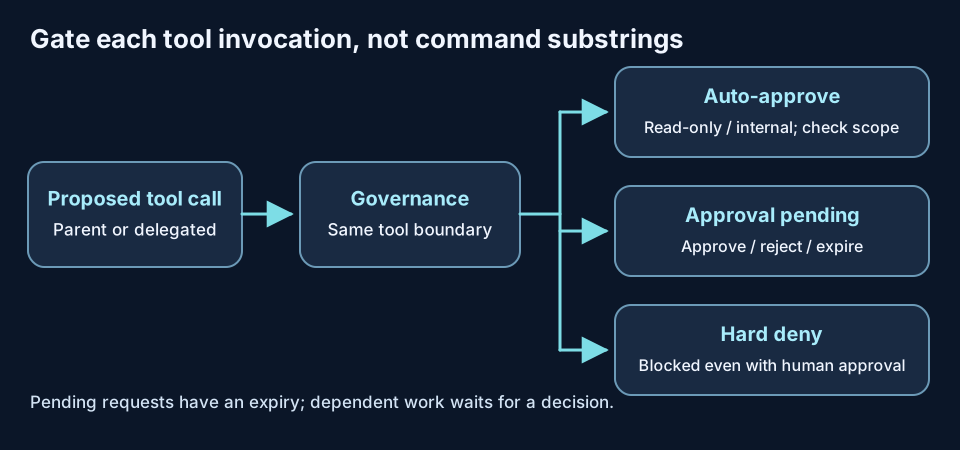
The middle branch is a pending request with an expiry, not permission to execute later without checking the decision.
A delayed decision creates state drift: production may have changed since the command was proposed. Short time-to-live limits (TTLs) expire old requests, and session-scoped caching avoids executing long-deferred approvals without re-evaluation. A short TTL reduces but cannot eliminate that risk.
Operators can see pending requests grouped by tool and handle some in bulk. Bulk review is most suitable for read-only investigation commands. State-changing calls should be inspected individually, or batching simply moves the rubber stamp to a larger button. If a request is rejected, the agent receives a tool error and can plan again; feedback such as “use staging instead” can guide that replanning. This is related to steering an AI agent mid-run.
A Delegation Bypass We Found
Our sub-agent tool-binding code predated HITL. We wrapped parent-agent calls with approval checks but initially omitted that delegation route. A sub-agent could then run a shell tool without the approval required of its parent. We routed parent, sub-agent, plan-step, and fallback binding through the same governance middleware—the policy-checking code around tool execution. This was a real bypass in our implementation; the ReAcTree bugs post gives more detail. Any new execution route should be tested for the same omission.
Choosing Where a Human Helps
| Tool type in our setup | Typical handling | Caveat |
|---|---|---|
| Read-only or informational | Auto-approve | Read access can still disclose sensitive data |
| State-modifying | Require approval | Review the concrete target and proposed change |
| Destructive | Hard deny | Approved alternatives need separate design |
| Internal memory write | No HITL prompt | Govern and audit internal changes separately |
Internal memory writes change the agent’s own state, not production servers. Exempting them from operator popups kept the high-risk approvals visible, but these writes can still affect later decisions and warrant access controls and an audit record.
Watch approval times, approval and rejection rates, and whether teams switch to blanket auto-approval. Very fast clicks or near-zero rejections can prompt investigation; neither metric alone proves review has failed. The goal is useful human judgment at the calls where it can change an outcome, with deterministic denial for actions that should never reach an approver.
How do you decide which agent actions deserve review? Find me on GitHub or LinkedIn.
StackGen builds AI-assisted SRE (site reliability engineering) tools. Our offering at ai.stackgen.com supports incident triage, diagnostics, and draft root-cause analyses.
Stay in the loop — production notes on AI agents, workflows, and SRE.
Low volume — new posts and curated reading lists. Unsubscribe anytime.