Authorize AI agent tool calls with OPA
How do you authorize AI agent tool calls with OPA? You put a decision between the model and the tool.
The agent can still choose gh secret set. Policy decides whether that call ever reaches the shell. That is the same enforcement-point story MCP tutorials and OpenShell tell: controls outside the agent, evaluated before side effects. Why OPA covered the history. This post ships the first Rego lab.
Key takeaways
- Prompts are not an authorization boundary.
- Aiden evaluates Rego against a factsheet before tools run.
- Start with one hard deny you can unit-test, then attach.
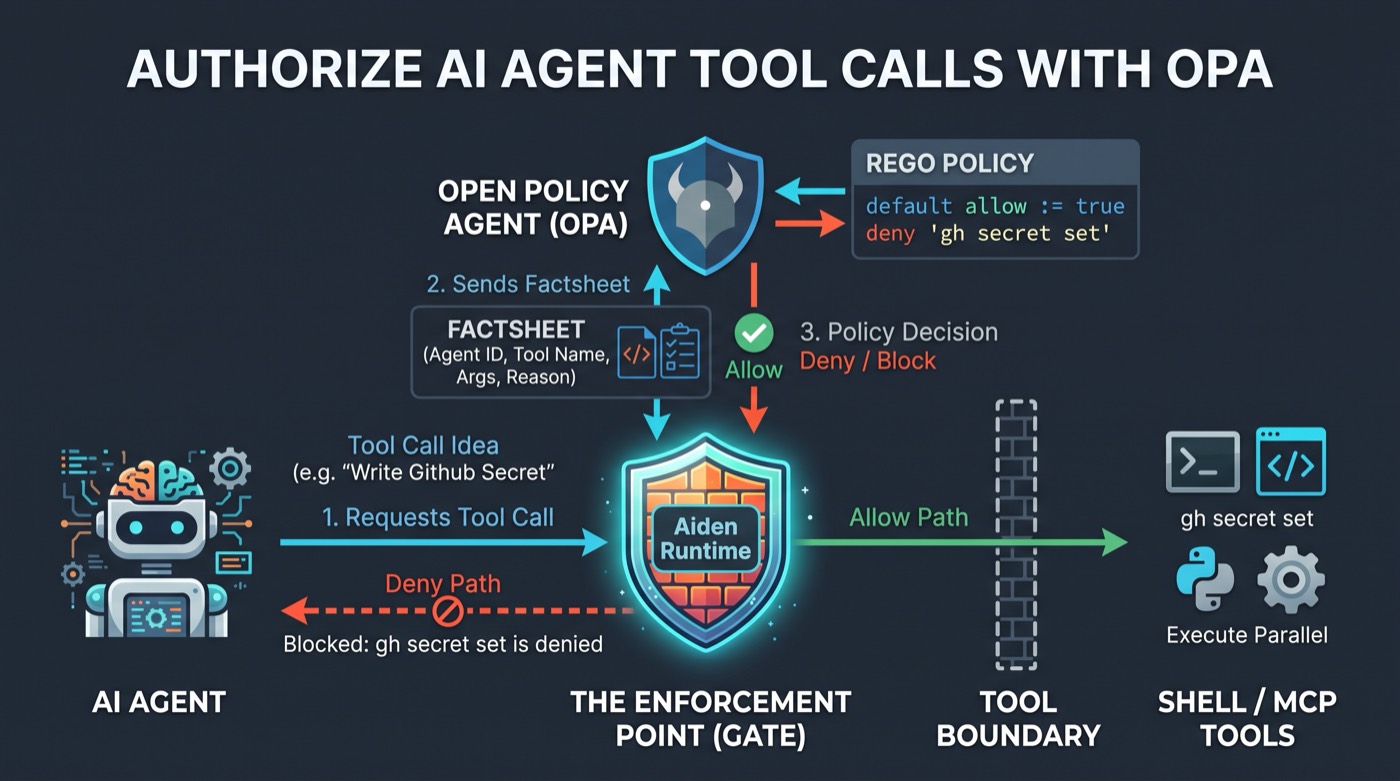
Agent proposes a tool call. Aiden Runtime sends a factsheet to OPA. Allow reaches the tool boundary; deny never does.
Why prompts fail as ACLs
You write: “Never set GitHub secrets.” The model still emits a tool call with gh secret set after a prompt injection, a confused summary, or a “just this once” reasoning trail. The failure is not that the prompt was unclear. The failure is that the only enforcer was the model.
Defense in depth puts policy at the tool boundary for that reason. OPA is one concrete engine for that layer.
Where does the enforcement point sit?
Architecture in one sequence:
- Model emits a tool call (name + arguments).
- PEP (Guild runtime) loads policies attached to that agent.
- Runtime builds a factsheet JSON and sends it to PDP (OPA).
- Rego returns allow, deny, or ask (
approval_required). - Only on allow (or after human approve) does the tool execute.
The agent cannot skip steps 2 through 4 by rephrasing. That is the whole point of an out-of-process gate. See the control-plane / data-plane diagram in Why OPA for AI agent guardrails.
Factsheet fields
| Field | Meaning |
|---|---|
agent |
Which agent is acting (id, name, optional tags) |
timestamp |
When the check ran (UTC RFC3339) |
tool.name |
Tool about to run |
tool.arguments |
Structured parameters (always an object) |
reason |
Optional short justification from the agent |
user / current_project |
Optional caller identity and project role |
policy_data |
Optional static JSON you store on the policy |
skill |
Optional loaded skill metadata |
approver / requester |
Present on HITL resolve for who may Approve |
Prefer policy_data for custom config. A top-level context key is legacy and not what current evaluators emit by default.
Policy types
| Type | Decision surface | Use when |
|---|---|---|
logic |
allow / deny_reason |
Hard allow or deny for this tool call |
intervention |
approval_required |
Pause for a human (ask) |
approval_authorization |
rules on input.approver |
Who may click Approve |
This post stays on logic deny. HITL comes in Guardrails and human approval.
Minimal Rego: deny gh secret set
Teaching shape from Aiden e2e GitHub guardrails. Package and rules match solutions conventions (package policy), not older provider snippets that use decision := "deny".
package policy

import rego.v1

default allow := true

allow := false if {
  endswith(input.tool.name, "_execute_parallel")
  some c in input.tool.arguments.commands
  contains(lower(c.command), "gh secret set")
}

deny_reason := "gh secret set is denied by policy" if {
  not allow
}
Example input that must deny:
{
  "agent": { "id": "demo-agent", "name": "demo-agent" },
  "timestamp": "2026-07-16T10:30:00Z",
  "tool": {
    "name": "github_execute_parallel",
    "arguments": {
      "commands": [{ "command": "gh secret set MY_TOKEN --body x" }]
    }
  },
  "reason": "lab"
}
Paste the same pair into the OPA Playground if you want a browser check first.
How do you verify before you attach?
Co-located tests in this blog’s sample pack:
cd samples/aiden-opa-policies
make opa-test
# or: opa test 01-deny-secret-write
Lab 01-deny-secret-write/ holds policy.rego and policy_test.rego. Fixtures under fixtures/ show the factsheet shape for playground or evaluate APIs.
Do not attach a policy you have not tested. A wrong deny bricks a demo; a missing deny ships a secret write.
Lab step
- Clone sks/sks.github.io.
- Install the OPA CLI.
- Run
make opa-testinsamples/aiden-opa-policies. - Edit the denied substring, add a fixture, re-run tests.
Next: create the policy in a tenant and attach it with Terraform. Manage AI agent policies as code with Terraform.
Want agents that cannot quietly write secrets? Create a free StackGen account, mint a personal access token, then dig into the sample pack.
Free to try: create an account, then create a personal access token for Terraform. StackGen / Aiden: app.stackgen.com.
Previous: Why Open Policy Agent for AI agent guardrails. Next: Manage AI agent policies as code with Terraform.
FAQ
How do you authorize AI agent tool calls with OPA?
Intercept the call after the model picks a tool but before execution. Send tool name, arguments, agent identity, and timestamp to OPA. Run the tool only when Rego allows.
What is an enforcement point for AI agents?
A server-side gate the agent cannot bypass by rephrasing. In Aiden, Guild evaluates attached Rego against a factsheet before MCP or shell tools run.
What fields does Aiden put on the OPA input?
agent, timestamp, tool.name, tool.arguments, reason, and optionally user, policy_data, and skill. Prefer policy_data for custom config rather than a top-level context key.
Should every policy default to deny?
For allow-list catalogs, yes (default allow := false). For a single deny rule like blocking secret writes, default allow := true and flip only matching calls is easier to reason about.
Stay in the loop — production notes on AI agents, workflows, and SRE.
Low volume — new posts and curated reading lists. Unsubscribe anytime.