Manage AI agent policies as code with Terraform
Manage AI agent policies as code the same way you manage infrastructure: Rego in git, plan before apply, attach by UUID.
Authorize with OPA proved a deny rule locally. This post puts that rule on an agent with the StackGen Terraform/OpenTofu provider. Background on why agent config moved to a provider lives in Terraform for agent configuration.
Key takeaways
sg_policycreates Rego;sg_agent_policy_attachmentbinds it to an agent.- Prefer
type = "logic"/"intervention"over staletool_callexamples. - Test with
opa test, thentofu plan, then attach.
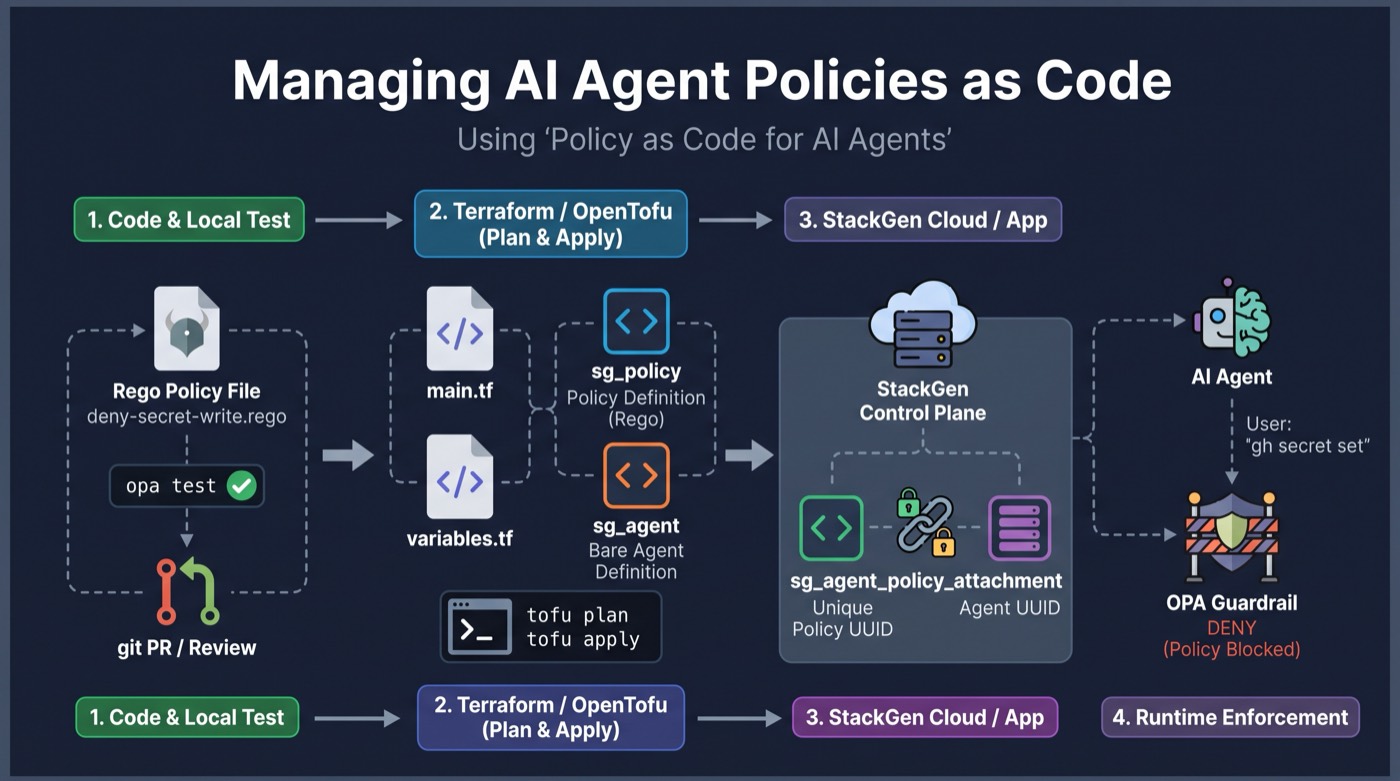
opa test locally, declare sg_policy and sg_agent_policy_attachment, tofu plan / apply, then Aiden enforces allow or deny on tool calls.
Architecture: control plane vs enforce path
Terraform (and the Guild API) own the control plane:
| Resource | Stores | Runtime effect |
|---|---|---|
sg_policy |
Rego text, type (logic / intervention / …), UUID |
Available for evaluation |
sg_agent |
Agent identity and config | Target for attachment |
sg_agent_policy_attachment |
(agent_name, policy_id, enabled) |
PEP includes that Rego for that agent |
Nothing in this path runs the LLM. tofu apply only mutates stored policy and links. The data plane (factsheet → OPA → allow/deny/ask → tool) is unchanged until a live tool call happens. That split is why you can opa test offline, tofu plan the attach, and only then enable enforcement.
Provider docs: terraform-provider-stackgen (pin v0.1.48). Prefer workspace_id on the provider; org_id / project_id are deprecated aliases.
Why policy as code for agents?
HashiCorp’s line for AI-driven infrastructure is “agent proposes, control plane governs.” Same split here: the model proposes a tool call; the platform policy decides. Putting Rego only in a UI click means the next incident has no PR to blame and no plan output to review.
OpenShell and gateway products roll rules in audit then enforce. Aiden’s practical equivalent: prove the rule with opa test, create it on a lab agent first, then enable the attachment on production agents.
Provider setup
You can exercise create/attach for free:
- Create a free account at app.stackgen.com.
- Open Personal access tokens and mint a token. That value is
stackgen_token. Never commit it. - Set
stackgen_urltohttps://app.stackgen.comandstackgen_workspace_idto your workspace UUID from the app.
Without URL, token, and workspace id, tofu apply has nowhere to create resources. Same bar as Aiden the Hard Way. Pin the provider to 0.1.48 (docs).
terraform {
  required_version = ">= 1.5"
  required_providers {
    sg = {
      source  = "releases.stackgen.com/stackgen/stackgen"
      version = "0.1.48"
    }
  }
}

provider "sg" {
  stackgen_url   = var.stackgen_url   # https://app.stackgen.com
  stackgen_token = var.stackgen_token # personal access token; never commit
  workspace_id   = var.stackgen_workspace_id
}
Docs: terraform-provider-stackgen · sg_policy.
Create the policy from a file
Keep Rego on disk. Terraform loads it with file().
resource "sg_policy" "deny_secret_write" {
  name        = "lab-deny-secret-write"
  description = "Deny gh secret set (teaching lab)"
  type        = "logic"
  rego_source = file("${path.module}/policies/deny-secret-write.rego")
}
Honest note on types: provider HTML examples still show type = "tool_call" and decision := "deny". Solutions and Hard Way use package policy with allow / approval_required and types logic / intervention. Teach the live shape.
Create a minimal agent and attach
The lab creates a bare sg_agent, then attaches the policy by UUID:
resource "sg_agent" "lab" {
  name        = var.agent_name
  description = "Teaching lab agent for OPA policy attach"
  persona     = "You are a lab agent used only to demonstrate policy attachment."
}

resource "sg_agent_policy_attachment" "deny_secret_write" {
  agent_name = sg_agent.lab.name
  policy_id  = sg_policy.deny_secret_write.id
  enabled    = true
}
For a full agent plus workflows in one module, use Aiden the Easy Way.
Lab step
Full teaching root:
samples/aiden-opa-policies/02-terraform-attach/
cd samples/aiden-opa-policies/02-terraform-attach
cp terraform.tfvars.example terraform.tfvars
# stackgen_url = https://app.stackgen.com
# stackgen_token = from Personal access tokens
# stackgen_workspace_id = your workspace UUID
tofu init
tofu plan
# tofu apply only when you intend to mutate the tenant
Next: clock-based rules. Time-based AI agent policies with OPA.
Policy reviews belong in PRs. Create a free account, mint a personal access token, then run the attach lab.
Free to try: create an account, then create a personal access token for Terraform. StackGen / Aiden: app.stackgen.com.
Previous: Authorize AI agent tool calls with OPA. Next: Time-based AI agent policies with OPA.
FAQ
How do you manage AI agent policies with Terraform?
Declare sg_policy with rego_source, then sg_agent_policy_attachment with agent_name and policy_id. Review with tofu plan before apply.
What is the StackGen Terraform provider source?
releases.stackgen.com/stackgen/stackgen at version 0.1.48. You need a tenant URL, personal access token, and workspace_id. Tokens never belong in git.
Should policy type be tool_call or logic?
Use logic for allow/deny and intervention for approval_required. Older provider examples still show tool_call; solutions modules use logic and intervention.
Does the Terraform attachment support priority?
The REST attach API accepts priority. The sg_agent_policy_attachment resource today exposes agent_name, policy_id, and enabled.
Stay in the loop — production notes on AI agents, workflows, and SRE.
Low volume — new posts and curated reading lists. Unsubscribe anytime.