Aiden the Easy Way: One Module from Vague Issue to Review PR
A GitHub Project card such as “make nav better” still needs acceptance criteria, repository research, a plan, and perhaps a pull request (PR). Aiden the Hard Way wires the sg_* resources for that workflow individually.
This post uses an OpenTofu module to assemble the same workflow. The module reduces configuration work; it does not verify the resulting issue comments or PR for you.
- Hard Way = understand every piece: provider, models, integration, agent, workflow, webhooks, schedule.
- Easy Way = consume a public module that already assembled those pieces for you.
You do not have to read the Hard Way first. Come back to it only when something subtle breaks (there’s a map at the end of this post).
Who this is for
You’ll get the most out of this if:
- You have (or can get) an Aiden / StackGen tenant and a GitHub Projects v2 board.
- You’re comfortable running
tofu applyand pasting a webhook URL into GitHub settings. - You want an agent that leaves evidence on the issue, not a black box that says “trust me.”
The module supplies a persona, workflow, and webhook configuration. You still need to set credentials, verify event delivery, and review permissions.
What to expect
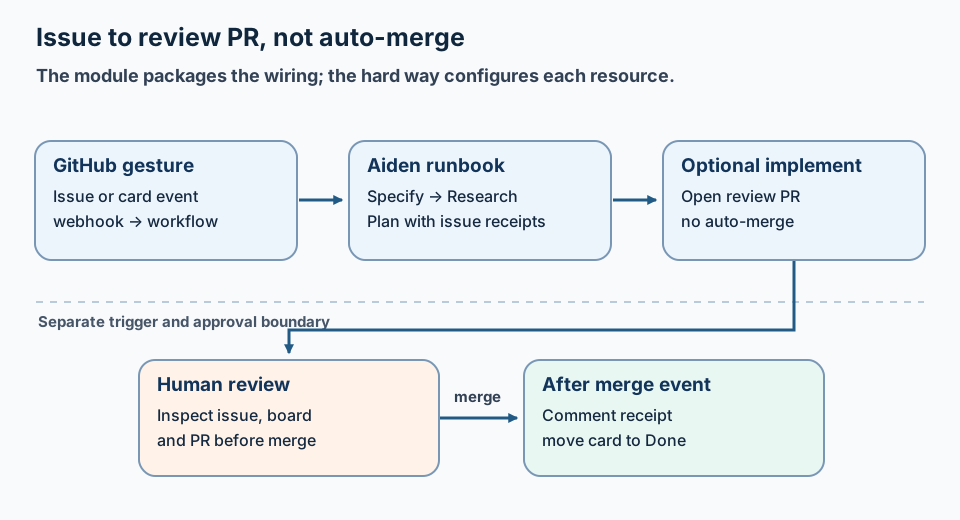
The module simplifies wiring, not the human review and merge boundary.
By the end of this post you will have applied one module and wired three GitHub gestures. For one Project item per run, the intended workflow is:
- Vague issue → Specify comment + Status hop
- Research against the repo (via GitHub APIs)
- Plan someone could implement
- Optional review PR (the agent opens it; you merge)
- Done — comment + Status hop after you merge
Stage comments on the issue provide a review trail; check the board status and PR independently. Merge stays a human decision, on purpose.
Want to see it before you build it? We dogfooded this on this very blog: navigation polish PR #31.
The rest of this post walks you through it in order: prerequisites → first demo → production shape → wiring → first run.
Prerequisites
- An active Aiden / StackGen tenant (URL + token + org/project id)
- GitHub personal access token (PAT) with
repo,read:project, andproject - OpenTofu ≥ 1.5 and StackGen provider
>= 0.1.33, != 0.1.35, < 0.2.0 - A Projects v2 board with columns that match Specify / Research / Plan / Done (names are configurable)
Pick your starting point
There are two ways to consume the module. Choose one:
| You are… | Use | Why |
|---|---|---|
| Trying it for the first time, nothing shared yet | First-time demo (below) | Creates the OpenAI + GitHub vaults for you |
| Already running Aiden with shared models + a GitHub integration | Production | Reuses what you have — no duplicate vaults |
The demo creates additional vaults; the production variant reuses existing integrations. Choose based on your tenant configuration.
Step 1 — First-time demo (all-in-one)
No shared foundation yet? Use the wrapper that creates OpenAI + GitHub vaults, then the assistant:
module "github_project_assistant" {
  source = "github.com/sks/aiden-github-project-assistant//wrappers/all-in-one?ref=v0.1.0"

  openai_api_key      = var.openai_api_key
  github_token        = var.github_token
  default_project_url = "https://github.com/users/YOU/projects/1"

  webhook_repository_full_names = ["YOU/your-repo"]
  enable_implement              = true
  enable_status_poll_schedule   = true

  webhook_trigger_base_url = "${var.stackgen_url}/guild"
  webhook_trigger_org_id   = var.stackgen_project_id
}
Runnable sample: examples/complete in the module repo.
cd examples/complete
cp terraform.tfvars.example terraform.tfvars   # fill secrets — never commit
tofu init && tofu plan && tofu apply

tofu output -raw webhook_ingress_payload_url
tofu output -raw webhook_token
tofu output -raw pr_webhook_ingress_payload_url
Step 1 (alternate) — Production (composable)
When you already have models and a GitHub integration:
module "github_project_assistant" {
  source = "github.com/sks/aiden-github-project-assistant?ref=v0.1.0"

  model_names                      = module.foundation.model_names
  existing_github_integration_name = module.github.integration_name

  default_project_url           = "https://github.com/users/YOU/projects/1"
  webhook_repository_full_names = ["YOU/your-repo"]

  enable_github_webhook       = true
  enable_implement            = true
  enable_pr_merged_webhook    = true
  enable_status_poll_schedule = true

  webhook_trigger_base_url = "${var.stackgen_url}/guild"
  webhook_trigger_org_id   = var.stackgen_project_id
}
Prefer this shape once foundation is shared — avoid a second OpenAI vault per board.
Step 2 — Wire the three gestures
After apply, tell GitHub how to reach Aiden. Three gestures, three wirings:
| Gesture | GitHub setting |
|---|---|
| Issue opened | Repo → Webhooks → Payload URL = webhook_ingress_payload_url, events Issues |
| PR merged | Second webhook (or same host with pr_webhook_ingress_payload_url), events Pull request |
| Card drag | Already covered by enable_status_poll_schedule (Projects v2 drags are not Issues events) |
Content type: application/json. Secret: webhook_token (or rely on apiKey in the URL).
Step 3 — Run it
- Open a vague issue on an allowlisted repo (or drag a card and wait for the poll).
- Watch Specify / Research / Plan comments appear; Status hops one column at a time.
- When implement is on, review the PR the agent opened — you merge.
- Done comment + Status hop after merge.
Board rules (same as Hard Way):
| Do | Don’t |
|---|---|
| One issue per run | Process the whole board at once |
| Comment evidence on the issue | Chat-only findings |
| One Status hop per stage | Silent jumps to Done |
| Human merge | Auto-merge |
When to read the Hard Way
Reach for Aiden the Hard Way when:
- A drag “does nothing” (wrong trigger)
- A comment body is literally
@file.md(-Fvs-f) - You want to know why the module creates a schedule and two webhooks
The module hides resource assembly, not the need to verify access, triggers, comments, and merge controls.
Where to go
- Module: sks/aiden-github-project-assistant (
v0.1.0) - Hard Way: /blog/from-vague-github-issue-to-pr-with-aiden/
- Provider context: Terraform for Agent Configuration
- Bring-up discipline: How to Debug Multi-Step AI Agent Workflows
Building AI agents that leave receipts on the systems you already use? Find me on GitHub or LinkedIn.
StackGen develops AI tools for site reliability engineering (SRE), including incident triage and diagnostic workflows. Product details are at ai.stackgen.com.
FAQ
What is the easiest way to run GitHub Project SDLC with Aiden?
Consume the public OpenTofu module sks/aiden-github-project-assistant. It creates the agent, workflow, guardrails, and optional webhooks/schedules for you.
Do I need to invent my own system prompt and webhook plumbing?
No. The module ships the persona, runbook, and trigger wiring. You pass tenant credentials, a Project URL, and toggles like enable_implement.
Should the agent merge the PR?
No. The easy path still keeps merge as a human decision. The agent opens a review PR; Done hops after you merge.
Where do I go if something subtle breaks?
Read Aiden the Hard Way for trigger semantics (issue opened vs card drag vs PR merge) and receipt/HITL lessons — then come back here for the module.
Stay in the loop — production notes on AI agents, workflows, and SRE.
Low volume — new posts and curated reading lists. Unsubscribe anytime.