Aiden the Hard Way: Vague GitHub Issues to Review PRs
A GitHub Project card that says “make nav better” leaves the scope and acceptance criteria to its reviewers.
Someone still has to define acceptance criteria (Specify), inspect the repository (Research), write an implementable proposal (Plan), and perhaps open a pull request (PR) (Implement).
I tested whether Aiden could take a vague GitHub issue through those stages and open a review PR. Issue comments provide a review trail; they do not replace human review of the proposed code.
We dogfooded this on this blog’s repo and a personal GitHub Project. This post is Aiden the Hard Way: a flat root of sg_* resources with the StackGen Terraform/OpenTofu provider — every layer you would otherwise hide inside a module. Prefer module "…" instead? Read the follow-up, Aiden the Easy Way.
Note: Snippets below are teaching shapes (shortened personas/runbooks). Swap URLs, tokens, and column names for your board.
Best practices for AI kanban automation
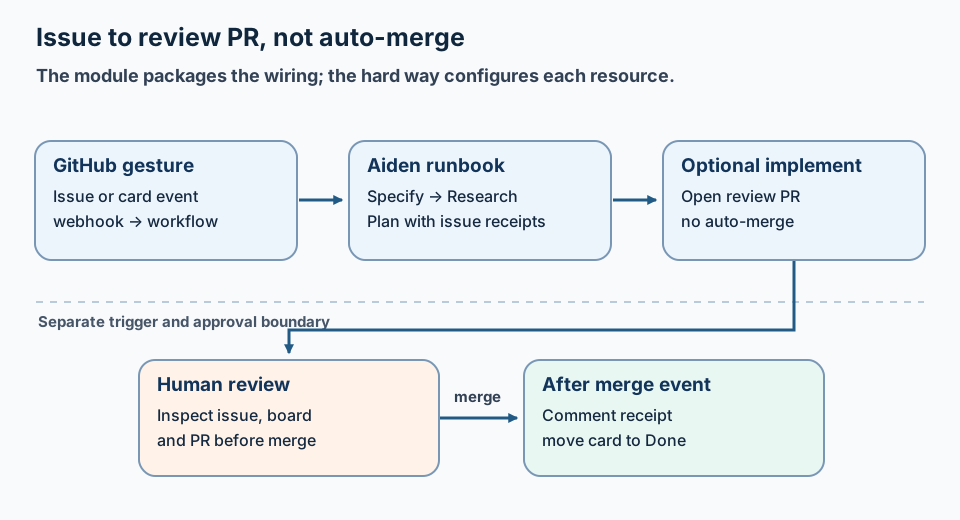
The workflow leaves issue receipts and a review PR; people decide whether to merge.
Before writing code, apply bring-up discipline to the board.
| Do | Don’t |
|---|---|
| Process one issue per run | Process the whole board at once |
| Comment evidence directly on the issue | Keep findings hidden only in chat |
| Hop Status one column at a time | Jump from Specify to Done in silence |
| Open a PR for humans to review and merge | Allow the AI to auto-merge |
Step 0: Set up the StackGen OpenTofu provider
Prerequisite: you need an active StackGen / Aiden tenant (URL + token + organization/project identifier). Without that, tofu apply has nowhere to create resources — this is not a local-only sandbox.
The StackGen provider "sg" lets this configuration be reviewed with plan and applied to a tenant. This example shows resource wiring rather than a local-only agent setup.
terraform {
  required_version = ">= 1.5"
  required_providers {
    sg = {
      source  = "releases.stackgen.com/stackgen/stackgen"
      version = ">= 0.1.33, < 0.2.0"
    }
  }
}

provider "sg" {
  stackgen_url   = var.stackgen_url   # e.g. https://ai.dev.stackgen.com
  stackgen_token = var.stackgen_token # never commit
  project_id     = var.stackgen_project_id
}

variable "stackgen_url" { type = string }
variable "stackgen_token" {
  type      = string
  sensitive = true
}
variable "stackgen_project_id" { type = string }

variable "openai_api_key" {
  type      = string
  sensitive = true
}
variable "github_token" {
  type        = string
  sensitive   = true
  description = "PAT with repo + Projects v2 (read:project, project)"
}

variable "default_project_url" {
  type    = string
  default = "https://github.com/users/YOU/projects/1"
}
This example uses OpenTofu (tofu) for fmt, init, plan, and apply; Terraform uses comparable commands.
Step 1: Configure the LLM provider and models
You only need one working model for this demo. We use OpenAI here; attach Anthropic the same way if you prefer Claude.
resource "sg_secret" "openai" {
  name        = "demo-openai-vault"
  description = "OpenAI API key"
  category    = "LLM"
  subcategory = "openai"
  metadata = {
    OPENAI_API_KEY = var.openai_api_key
  }
}

resource "sg_guild_model_provider" "openai" {
  name            = "openai"
  provider_type   = "openai"
  token_reference = sg_secret.openai.name
}

resource "sg_guild_model" "primary" {
  name          = "gpt-5.4-2026-03-05" # use a model your tenant already knows
  provider_name = sg_guild_model_provider.openai.name
  # …other model fields per your tenant / provider docs
}
Step 2: Integrate GitHub Issues and Projects
A GitHub personal access token (PAT) needs Projects scopes for GraphQL Status reads; without them, those reads fail in opaque ways. Budget time for token scopes before blaming the agent.
resource "sg_secret" "github" {
  name        = "demo-github-vault"
  description = "GitHub PAT for Projects + issues + PRs"
  category    = "SCM"
  subcategory = "github"
  metadata = {
    provider = "github"
    token    = var.github_token
  }
}

resource "sg_guild_integration" "github" {
  name           = "github-integration"
  description    = "GitHub for Project Status, comments, optional PR"
  type           = "github"
  enabled        = true
  secret_ref_ids = [sg_secret.github.id]

  image = {
    name = "ghcr.io/stackgenhq/github-mcp:latest" # pin what your tenant documents
  }
}
Step 3: Define guardrails and human-in-the-loop (HITL) policies
We want the agent to have autonomy to open a PR (gh pr create), but accountability to land it. Keep destructive actions and merges behind HITL approval. The sample string-matching policy covers the listed command text, not every possible mutation path; review tool permissions separately.
resource "sg_policy" "guardrails" {
  name        = "github-project-assistant-guardrails"
  type        = "intervention"
  description = "HITL for destructive shell / merge / CI dispatch"
  rego_source = <<-REGO
    package policy
    import rego.v1

    default approval_required := false

    approval_required if {
      contains(input.tool.name, "_execute_command")
      cmd := lower(input.tool.arguments.command)
      some p in {"rm -rf", "git push --force", "gh pr merge", "gh workflow run"}
      contains(cmd, p)
    }
  REGO
}
Step 4: Deploy the AI agent and budget policy
Put your long persona in a persona.md file next to your root (mission, comment template, “do not merge”). Keep absolute filesystem paths out of spawn goals — they trip execution-surface guards when GitHub tools expect relative paths.
resource "sg_agent" "project_assistant" {
  name        = "github-project-assistant"
  persona     = file("${path.cwd}/persona.md")
  model_names = [sg_guild_model.primary.name]

  integrations = [sg_guild_integration.github.name]

  auto_approve_tools = [
    { tool = "${sg_guild_integration.github.name}_*" },
    { tool = "note" },
    { tool = "read_notes" },
  ]
}

resource "sg_agent_budget" "project_assistant" {
  agent_name  = sg_agent.project_assistant.name
  limit_usd   = 20
  period_type = "daily"
}

resource "sg_agent_policy_attachment" "guardrails" {
  agent_name = sg_agent.project_assistant.name
  policy_id  = sg_policy.guardrails.id
  enabled    = true
}
Step 5: Bind the agent runbook to a workflow
The runbook markdown is the playbook: how to read Status, what Specify/Research/Plan must post, and when to open a PR. Bind it to a single workflow stage so chat and webhooks share one entrypoint.
resource "sg_runbook_sop" "item_assist" {
  name        = "github-project-item-assist"
  approve     = true
  description = file("${path.cwd}/runbook-item-assist.md")
}

resource "sg_workflow" "item_assist" {
  name        = "github-project-item-assist"
  domain      = "software-engineering"
  description = "One GitHub Project item: Specify → Research → Plan (+ optional PR)"
  approve     = true

  required_inputs = ["project_url", "issue_number"]
  optional_inputs = ["repository", "auto_advance", "sdlc_chain"]

  stages = [
    {
      stage_id    = "assist_item"
      description = "Board SDLC for one issue; comments; Status hops; optional PR"
      required    = true
    },
  ]

  stage_bindings = [
    {
      stage_id     = "assist_item"
      agent_ref    = sg_agent.project_assistant.name
      runbook_refs = [sg_runbook_sop.item_assist.name]
    },
  ]
}
Start the workflow, not a naked agent chat — inputs stay structured.
Step 6: Trigger workflows with GitHub webhooks
Register the repo webhook for Issues (opened), content type JSON, and secret = webhook_token.
resource "sg_webhook" "issues" {
  name           = "github-project-item-assist-issues"
  target_type    = "workflow"
  target_name    = sg_workflow.item_assist.name
  enabled        = true
  token_rotation = "v1"

  action = <<-EOT
    GitHub issue opened. Extract repository.full_name and issue.number.
    project_url = ${var.default_project_url}
    auto_advance = true
    sdlc_chain = true
    If the issue is missing from the Project, add it under Specify, then run
    Specify → Research → Plan. When implement is enabled in the runbook, open a
    review PR after Plan. Do not merge. Ignore non-open noise.
  EOT
}

output "webhook_token" {
  value     = sg_webhook.issues.token
  sensitive = true
}

output "webhook_ingress_payload_url" {
  description = "Paste into GitHub → Webhooks → Payload URL"
  sensitive   = true
  value = format(
    "%s/guild/api/v1/webhooks/trigger?apiKey=%s&orgId=%s",
    trimsuffix(var.stackgen_url, "/"),
    urlencode(sg_webhook.issues.token),
    urlencode(var.stackgen_project_id),
  )
}
Step 7: Schedule Status polls for Projects
Dragging a Projects v2 card is not an issues event. If you want the agent to react when a human drags a card from Research to Plan, you need a schedule. Webhooks and schedules share the same target_type and target_name pairing.
resource "sg_agent_schedule" "status_poll" {
  target_type = "workflow"
  target_name = sg_workflow.item_assist.name
  name        = "github-project-status-poll"
  expression  = "*/5 * * * *" # five-field cron, UTC
  enabled     = true

  action = <<-EOT
    Poll Project ${var.default_project_url}.
    Pick at most ONE item in Research or Plan that still needs a matching
    "### Aiden project assist — <Stage>" comment (or Plan ready for implement
    with no PR yet). Prefer Plan. Then run github-project-item-assist for that
    issue with project_url, issue_number, repository, auto_advance=true,
    sdlc_chain=true. If idle, reply "status poll: idle" and stop.
  EOT
}
Troubleshooting common pitfalls
If you hit a wall during your tofu apply loop, check these:
- Dragging a card did nothing: Repo Issues deliveries only show
openedandping. Dragging a Projects v2 card is not anissuesevent. The schedule block in Step 7 is the fix for personal boards — eventual, not instant. Match the trigger to the UI gesture. - The agent posted
@comment.mdas text: Forgh api, a capital-Fexpands the@file, while a lowercase-fsends the literal path string. Make sure your runbook explicitly uses-F:
gh api "repos/$OWNER/$REPO/issues/$N/comments" -F body=@assist_comment.md
This is the same class of bug as putting #42 on a shell command line — everything after # is treated as a comment, so the rest of the command disappears.
Wrapping up: see it in action
Apply the flat root, then open a vague issue (or drag a card and wait for the poll):
tofu init
tofu plan
tofu apply

tofu output -raw webhook_ingress_payload_url
tofu output -raw webhook_token
Once applied and triggered, the workflow should leave structured comments on GitHub issues; inspect the actual comments and PR before treating a stage as complete. A successful stage comment should look like this:
### Aiden project assist — Specify

**Issue:** #29
**Status (before):** Specify
**Status (after):** Research
**auto_advance:** true

#### Output
Goal, in/out of scope, acceptance criteria, open questions…

#### Next human step
Review, answer questions, or let the chain continue.
Our dogfooding closed with navigation polish PR #31 — the agent opened it, and a human merged it.
Key takeaways
sg_*resources are the product surface — understand them before wrapping modules.- Order of operations matters — secrets → providers/models → integrations → agent → workflow → webhook/schedule.
- Receipts on GitHub — issue comments beat chat transcripts.
- Issue opened ≠ card dragged ≠ PR merged — wire the triggers you care about.
- Merge stays human in this workflow; also review other mutation paths beyond the example policy.
Where to look next:
- Aiden the Easy Way — same outcome via a public OpenTofu module
- Terraform for Agent Configuration
- How to Debug Multi-Step AI Agent Workflows
- AI Agent Runtime vs Platform
Building AI agents that leave receipts on the systems you already use? Find me on GitHub or LinkedIn.
StackGen develops AI tools for site reliability engineering (SRE), including incident triage and diagnostic workflows. Product details are at ai.stackgen.com.
FAQ
Can an AI agent run a GitHub Project board SDLC?
Yes, if you keep the board as the source of truth, write evidence as issue comments, and treat Status hops as one step at a time — with humans merging any PR.
How do you configure Aiden agents with Terraform or OpenTofu?
Aiden ships a Terraform/OpenTofu provider. This Hard Way post declares agents, workflows, webhooks, schedules, and policies as flat sg_* resources. For a packaged module, see Aiden the Easy Way.
Why did dragging a Project card not trigger my agent webhook?
Repo Issues webhooks fire on issue events, not on Projects v2 Status changes. You need a different signal — for example, a short poll of the board — if humans drag cards.
Should the agent merge the PR?
No. Opening a reviewable PR is enough for a first loop. Merge stays a human decision.
Stay in the loop — production notes on AI agents, workflows, and SRE.
Low volume — new posts and curated reading lists. Unsubscribe anytime.