The Cost Levers of Self-Managed ClickHouse on AWS
ClickHouse on AWS: Self-Managed from First Principles · Part 7
Self-managed ClickHouse is only worth the operational work if the bill stays predictable. I run a log analytics platform on Amazon Elastic Compute Cloud (EC2) — writers, readers, Keeper, S3-backed storage — and this post shows the real monthly numbers, then every lever that moves them. The levers are simple: arm64 central processing units (CPUs), spot instances, an Amazon Simple Storage Service (S3) lifecycle rule, no bastion host, one janitor Lambda — a small program that cleans up behind you every day. Simple is the point.
First the steady state, then each lever with its number, then the guardrails, then the war story. The war story is the reason this post exists: one Terraform setting leaked about 38 terabytes (TB) — roughly $1,700 a month — and no tag would have identified it. The sentence that drives everything below: costs should fall with load, not just rise.
Key takeaways
- A dev profile runs ~$150–250/month; the prod profile runs ~$3,100–3,500/month in us-east-1, lifecycle included.
- Graviton, a 50% spot split on readers, and S3 Standard→Infrequent-Access tiering do most of the work.
delete_on_termination = falseon inline Elastic Block Store (EBS) volumes is a silent leak. Standalone taggedaws_ebs_volumeresources plus a daily janitor close it.
The steady state
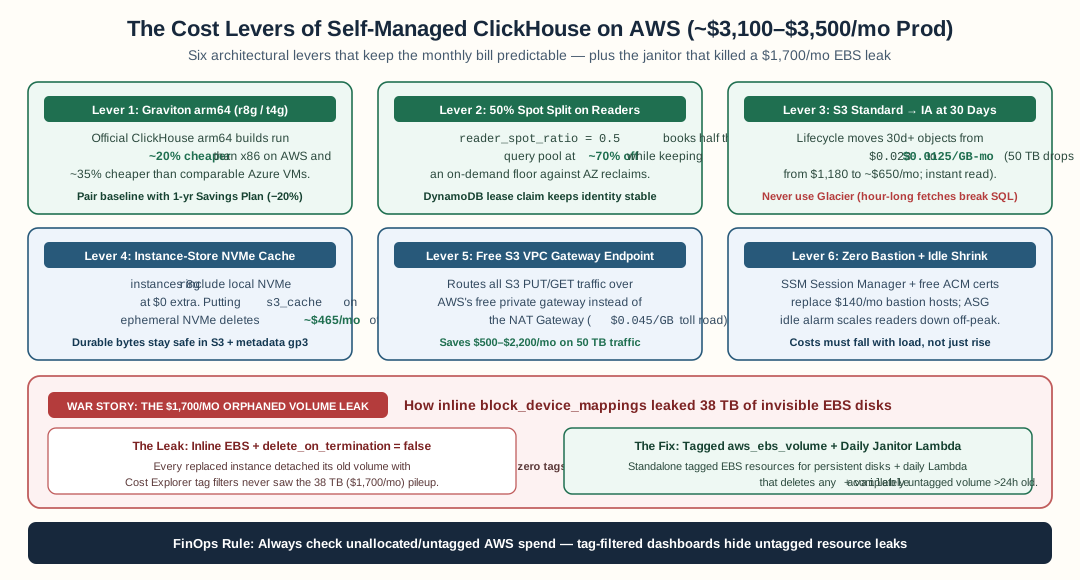
Graviton arm64, 50% Spot readers, 30-day S3 Standard-IA tiering, instance-store NVMe caching, a free S3 VPC Gateway Endpoint, and standalone tagged EBS volumes with a daily janitor keep the 50 TB production profile around $3,100–$3,500/month.
us-east-1, November 2026 rates. Keeper is the coordination service ClickHouse uses for the replication log — the shared to-do list replicas copy parts from. It needs its own small hosts.
| Dev (~$150–250/mo) | Prod (~$3,100–3,500/mo) | |
|---|---|---|
| Writers | 1 × t4g.large | 2 × r8g.2xlarge |
| Readers | 1, on-demand | 3 × r8g.4xlarge at 50% spot |
| Keeper | 1 × t4g.small | 3 × r8g.xlarge |
| Backup | — | 1 × t4g.xlarge |
| Storage | ~500 gigabytes (GB) → ~$25/mo | ~50 TB → ~$650/mo with Infrequent Access (IA) lifecycle (~$1,180 without) |
Lever 1: Graviton arm64
Graviton is the arm64 CPU family from Amazon Web Services (AWS). Think of CPU families as car engines: a car must be built for one engine brand before it can run on it. ClickHouse publishes official arm64 builds, so the car is already built for this engine, and every trip burns ~20% less fuel than the x86 engine for the same work — ~35% less than the comparable Azure Ebdsv5 series I priced while comparing clouds. In AWS terms, Graviton is the cheaper engine: the same software at a lower price per virtual central processing unit (vCPU).
Lever 2: spot for readers
Spot instances are spare EC2 capacity, sold at up to ~70% off; AWS can take one back with a 2-minute notice (what Spot is). Compare standby airline seats: the same seat at a much lower price, but the airline can take it back at the last moment. A group that books only standby may end up with nobody on the plane. Readers are the safe place for spot: a replaced reader re-warms from S3-backed storage on its own. reader_spot_ratio: 0.5 keeps half the group on full-price tickets and half on standby, so the group always flies. In AWS terms, the on-demand half is the floor that guarantees capacity; the spot half is the cheap seats that scale.
Lever 3: S3 tiered storage with a lifecycle rule
S3 Standard lists at $0.023/GB-month; Azure Blob hot tier lists around $0.035/GB-month (S3 pricing). The bigger lever is a lifecycle rule. Picture boxes at home: boxes you open often stay in the room you rent by the month; boxes you almost never open move to a cheaper storage unit after 30 days. Same boxes, lower rent — $0.023 → $0.0125/GB-month (storage classes) — and you can still fetch any box in seconds. That is why you never use the deep-freeze vault (Glacier), where fetching takes hours. At 50 TB that is ~$650/month instead of ~$1,180. In AWS terms, the lifecycle rule is the moving service: it relocates old objects from Standard to Infrequent-Access automatically. IA charges a fee per GB fetched, so only tier data that is rarely read — logs older than a month.
Lever 4: gp3, not premium solid-state drive (SSD)
gp3 volumes cost roughly half the $/GB of premium cloud SSD tiers and include a 3,000 IOPS baseline at no extra charge. IOPS means input/output operations per second — disk reads and writes. Local EBS only holds the hot cache and where merges write; S3 holds the durable copy. Paying premium-SSD prices for a cache is the most common mistake I see in self-managed bills.
Lever 5: no private-endpoint tax
The S3 gateway endpoint is a private road between your house and the warehouse: free to use. The public toll road is the network address translation (NAT) gateway, at $0.045/GB — every truckload pays. Your heaviest traffic is the data itself, so it takes the free road. In AWS terms, the endpoint is a route from your virtual private cloud (VPC) (your private network) to S3 that never touches the toll road (S3 gateway endpoints). The comparable Azure private endpoint bills $7.30/month each plus $0.01/GB processed — at 50 TB of monthly traffic, about $500. That line item does not exist here.
Lever 6: AWS Systems Manager (SSM) Session Manager, no bastion
SSM Session Manager opens a shell through the SSM agent channel. It costs $0, Identity and Access Management (IAM) permissions limit who can connect, and every session is logged. A bastion is a separate EC2 instance you must pay for, patch, and guard — about $140/month.
Lever 7: AWS Certificate Manager (ACM) certificates
ACM issues public certificates free, renewal included. Transport Layer Security (TLS) — the encryption between servers — costs nothing but the load balancer listener.
The Non-Volatile Memory Express (NVMe) option: cache_on_nvme_instance_store
r8g instances ship with instance-store NVMe — local disks included in the instance price, $0 extra. cache_on_nvme_instance_store uses them as the hot cache. Ephemeral means the disks are erased when the instance stops or is replaced. That is acceptable for a cache: it re-warms from S3, where the durable copy lives. You rebuild a cache; you do not lose data. This deletes the whole gp3 cache line: ~$465/month in the prod profile.
Savings Plans on the always-on baseline
Savings Plans trade a spend commitment for a discount (user guide). Think of a transit pass: you pay for the daily commute up front and get ~20% off those trips. You would not buy a pass for trips you might cancel. In AWS terms, the commute is the always-on baseline — writers, keepers, the on-demand reader floor, the backup node, together ~40% of compute. Commit one year on that portion for ~20% off. Never commit the spot side: it is already discounted.
Idle engineering: costs should fall with load
Three mechanisms, in order of size:
- Scheduled scale-in. The dev profile shrinks to zero outside business hours. About 16 hours a day of dev compute disappears.
- Target-tracking CPU scaling. Readers scale out on CPU utilization and back in when quiet. Scaling in is the half people forget to configure.
- The idle-shrink alarm. Average reader CPU under 15% for 7 days pages you to reduce
reader_count. Picture a shop manager who closes a counter that has had no customers all week. In ClickHouse terms, the alarm is that manager: it tells you to shut down a reader that has done almost nothing for 7 days. Costs should fall when customers leave, not only rise when they arrive.
Guardrails
- AWS Budgets: actual-plus-forecast alerts at 50/80/100% of the monthly budget (managing costs with budgets). The forecast alert is the one that catches slow leaks.
- Cost Anomaly Detection on the ClickHouse cost categories: it learns your normal spend and pages you on unusual spikes.
- Multipart-abort lifecycle rule. A multipart upload is one large file sent in several pieces; a spot reclaim mid-merge can leave the pieces half-sent. Without cleanup, you pay for them forever. The rule deletes incomplete uploads 7 days after they start.
The war story: $1,700/month of invisible volumes
A war story is a story of something that went wrong, told so others can avoid the same mistake. Mine is best told as an apartment rental.
The setup. Imagine you rent out apartments. When a tenant moves out, the furniture stays behind — and you, the landlord, keep paying rent for every piece. Nobody tells you. Every data disk was an inline EBS volume inside the aws_instance resource, with delete_on_termination = false. The setting looked safe: a replaced instance should never destroy data.
The mechanism. When an instance is replaced (spot reclaim, scale-in, terraform apply recreation), an inline volume with delete_on_termination = false detaches and keeps billing. Worse: the furniture has no name tag. Inline volumes inherit no tags. The instance carried Name, Team, CostCenter; the detached volume carried nothing. Cost Explorer showed a growing EC2-EBS line with no identity attached.
The discovery. The bill grew ~$1,700/month over five months. The audit found ~38 TB of unattached, untagged volumes — one for nearly every replacement since launch. That is 38 TB of forgotten cupboards, each still charging rent.
The fix, two parts:
- Name tags on every piece of furniture. All data disks became standalone
aws_ebs_volumeresources with the full tag set, attached withaws_volume_attachment. A standalone volume carries the tags you write, so the next leak is visible the day it starts. - A daily inspector. A leak-guard Lambda on an EventBridge
rate(1 day)schedule walks the building every day. It deletes only what is unattached, completely untagged, and older than a 24-hour grace window. It reports — never deletes — unassociated Elastic IP addresses (EIPs)—Internet Protocol (IP) addresses not attached to running resources—and untagged snapshots, like calling the owner about something suspicious instead of throwing it out. An alarm pages the moment a run finds anything.
Lesson: self-managed means your bill has failure modes. Cloud spending breaks like software does: silently, in the background, on a setting that looked safe. Build janitors — small programs that clean up every day.
Per-tenant chargeback for free
Each tenant writes to its own S3 prefix — a named shelf inside one shared warehouse. Per-prefix byte metrics and Storage Lens groups turn those shelves into a per-tenant cost report with no extra infrastructure. A tenant at 2 TB costs what 2 TB costs, and the report says so by name.
Previous: Operations runbooks for self-managed ClickHouse. Next: After ReplicatedMergeTree: Content-Addressed Storage (CAS), Iceberg, and when to just buy ClickHouse Cloud.
FAQ
What does self-managed ClickHouse on AWS actually cost per month?
In us-east-1, a dev profile with one t4g.large writer, one on-demand reader, and one t4g.small keeper runs about $150-250/month. The prod profile — 2 r8g.2xlarge writers, 3 readers at 50% spot, 3 keepers, a backup node, and 50 TB of S3 — runs about $3,100-3,500/month.
How much do spot instances save on ClickHouse readers?
Spot runs up to ~70% below on-demand. A reader_spot_ratio of 0.5 puts half the readers on spot and keeps an on-demand floor so a spot reclaim never drops query capacity. The on-demand half keeps the always-on baseline; the spot half does the cheap scaling.
What is an orphaned EBS volume and how do you prevent it?
An inline EBS volume with delete_on_termination = false detaches and keeps billing when its instance is replaced, and inline volumes inherit no tags so nothing in Cost Explorer identifies them. Move data disks to standalone tagged aws_ebs_volume resources and run a daily janitor Lambda that deletes unattached, completely untagged volumes older than 24 hours.
How does the S3 Infrequent-Access lifecycle save money?
A lifecycle rule moves objects from Standard at $0.023/GB-month to Infrequent-Access at $0.0125/GB-month after 30 days. At 50 TB that is about $650/month instead of $1,180. IA charges a per-GB retrieval fee, so only tier data that is rarely read — like logs older than 30 days.
Should I use instance-store NVMe instead of gp3 for the ClickHouse cache?
Yes, if the instance family includes it. cache_on_nvme_instance_store uses the instance-store NVMe disks that ship free with r8g instances. The cache re-warms from S3 after a replacement, and the entire gp3 cache line item — about $465/month in the prod profile — goes away.
Stay in the loop — production notes on AI agents, workflows, and SRE.
Low volume — new posts and curated reading lists. Unsubscribe anytime.