Operating Self-Managed ClickHouse: Golden Images, Bootstrap, and Runbooks
ClickHouse on AWS: Self-Managed from First Principles · Part 6
Self-managed means you are the operator.
The previous posts in this series covered the architecture of a log analytics platform I run: tiered storage, readers on spot, replication. None of that runs itself. This post is about the simple, boring machinery. It turns a fleet of Amazon Elastic Compute Cloud (EC2) machines into something that behaves like a managed service: a golden image, a two-stage bootstrap, a rolling config refresh, and runbooks written before the incident. If that sounds like extra work, compare it with the alternative: you learn all of it during an outage.
Key takeaways
- A Packer-built golden Amazon Machine Image (AMI) cuts node boot from 8-12 minutes to 2-3; on spot churn that is capacity you keep.
- EC2 user-data is limited to 16 kilobytes (KB), so the real 60 KB install script lives in Amazon Simple Storage Service (S3) and stage-1 pulls it with the instance role.
- A bucket-notification config refresh rolls readers → backup → keepers → writers, with a DynamoDB debounce collapsing the ~16-event storm into one pass.
- Plain EC2 skips the Kubernetes operator’s safety work; a parity table of what you owe yourself keeps the gaps visible.
- Alarms carry their remediation in the text, including an idle-shrink alarm so cost falls with load, not just rises.
The golden AMI
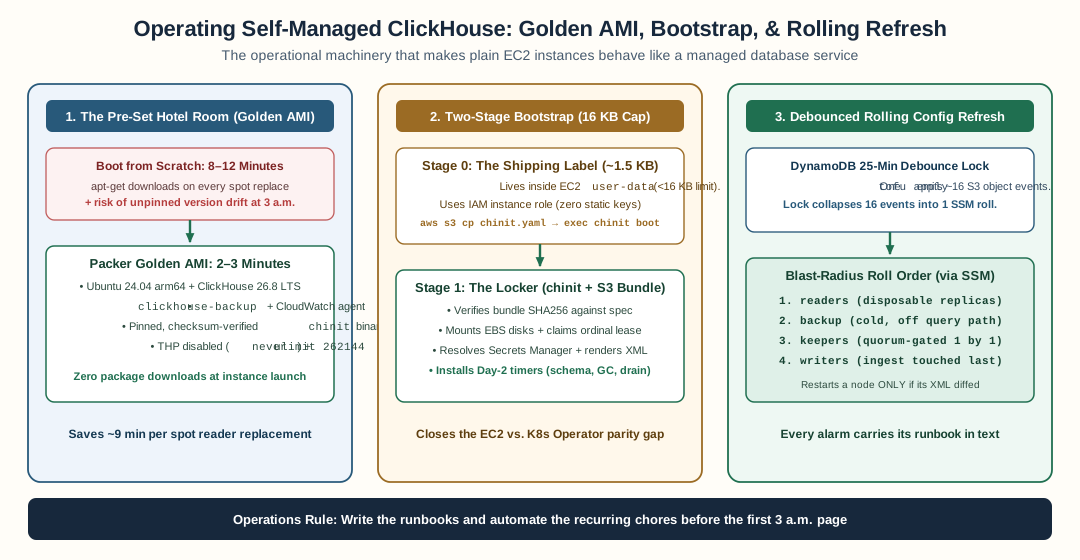
A Packer golden AMI cuts spot reader boot from twelve minutes to two, a two-stage bootstrap stays under EC2’s 16 KB user-data cap, and a DynamoDB debounce lock collapses S3 config event storms into one blast-radius-ordered SSM roll.
Think of a hotel. Every room is pre-set: linens, towels, kettle. A guest can check in and use the room in three minutes. Preparing a room from scratch every time would take twelve. Rooms here are EC2 machines, and because readers run on spot, rooms are re-occupied constantly. That is what boot-from-scratch looked like: every node built itself from a plain Ubuntu image (package downloads, ClickHouse install, agent installs, operating system (OS) tuning), which took 8-12 minutes per boot. On a spot reader replaced at 14:00, that is ten minutes where the reader exists but cannot serve queries. The fleet churns constantly, so the cost repeats.
The fix is a Packer golden AMI. An AMI (Amazon Machine Image) is a disk template for a virtual machine. The golden AMI is Ubuntu 24.04 arm64 with everything pre-installed, the way the hotel pre-sets the room:
- ClickHouse 26.8 Long Term Support (LTS), pinned by exact version. “Pinned” means the build always installs this exact version. An unpinned install silently picks whatever is newest. A surprise upgrade at 3am is a bad incident.
- clickhouse-backup and the Amazon Web Services (AWS) command-line interface (CLI).
- CloudWatch agent.
- OS tuning: Transparent Huge Pages (THP) disabled,
ulimit -n 262144. THP is a kernel feature. The kernel glues small 4KB memory pages into large 2MB ones. That gluing work runs in the foreground, and memory allocators (the code that hands memory to programs, jemalloc inside ClickHouse included) then see sudden latency jumps. ClickHouse’s own docs recommend disabling THP.
Boot goes from 8-12 minutes to 2-3: attach the data disks, join the cluster, done. In ClickHouse terms, the pre-set hotel room is the golden AMI, and check-in time is node boot.
Two-stage bootstrap
Here is a delivery analogy. A shipping label can only be 16 KB. So the label does not carry the whole instruction book. The label only says: “Open locker X.” The full instruction book waits inside the locker. The courier carries the locker key on her own keyring. No key is written on the label. In ClickHouse terms, the label is EC2 user-data — the script EC2 runs at first boot, capped at 16KB (docs). The locker is an S3 prefix (a folder in Amazon S3).
This stack shipped with the instruction-book version: a ~60KB stage-2 bash script in the S3 prefix — install ClickHouse, tune the OS, write configs, claim the ordinal, register DNS, join the cluster. It worked, and it taught us why it was the wrong shape: the script was templated by Terraform (every cluster variable an interpolated string), untestable without a live machine, and its retry logic was folklore per step. The three-thousand-line stage-2 plus its stage-1 became chinit — a single Go binary — and the two stages became a wrapper and a pipeline:
┌───────────────────────────────────────────────┐
│ stage 0  (inside user-data, ~1.5KB)            │
│  aws s3 cp chinit-<role>.yaml                  │
│  verify baked binary → exec chinit boot        │
└──────────────────┬────────────────────────────┘
                   ▼
┌───────────────────────────────────────────────┐
│ chinit (one binary, 24 typed steps)            │
│  fetch SHA256-gated bundle → mount disks      │
│  claim identity → resolve secrets → render     │
│  start server → install recurring jobs as      │
│  its own subcommands                          │
└───────────────────────────────────────────────┘
Stage-0 fits under the 16KB cap by doing almost nothing — it seeds the node’s role spec from S3 using the instance role (a permission attached to the machine itself; the machine inherits it while it runs — no static credentials anywhere), verifies the binary the golden AMI baked, and execs it. Everything else lives in the binary and the bundle. The full step-by-step walkthrough — what each of the twenty-four steps does, which failures abort and which warn — is its own post.
Rolling config refresh
This is the piece people underestimate. ClickHouse config lives in Extensible Markup Language (XML) files shipped to every node. Changing a Transport Layer Security (TLS) certificate means new XML on every writer, reader, keeper, and backup node, plus a restart on the nodes where the file actually changed.
Imagine a hotel chain that updates its breakfast menu. The chain does not change all hotels at once. It updates one region after another — readers → backup → keepers → writers — and only hotels whose menu actually changed reprint and restart their kitchens. In ClickHouse terms, the hotel chain is the cluster, the menu is the XML config, and the regions are node roles.
Concretely: the files live in S3 under configs/. A bucket notification on configs/*.xml fires a Lambda (a small AWS function that runs on events). The Lambda rolls a refresh script over AWS Systems Manager (SSM), AWS’s tool for running commands across many machines in a fixed order:
readers  →  backup  →  keepers  →  writers
  ^          ^           ^           ^
 disposable   cold        quorum     last
Readers first because they are disposable. Writers last, so a bad change shows up on the nodes you can afford to have wrong. The script hashes each node’s config before and after (compares a short fingerprint of the file) and restarts a node’s service only when the config actually changed. A one-file TLS change is therefore one restart on the affected nodes, not a fleet-wide replacement.
One problem remains: a single terraform apply emits around 16 S3 events (one per changed file, plus versioning artifacts). A naive listener restarts the fleet 16 times. That is 16 menu-update notices arriving on the same day, and 16 regions reprinting. The fix is a debounce. Picture a sticky note at the head office that says “we are already doing this today.” The first notice starts the update; the other 15 see the note and stop. In ClickHouse terms, the sticky note is a DynamoDB lock with a 25-minute time-to-live (TTL). The Lambda takes the lock before it rolls, and later events mark the lock dirty, so the current holder re-runs once after finishing. Without the debounce, a one-file change can mean 16 rolling restarts. With it, always one.
The runbooks
Airlines write their checklists before the flight, rehearse them, and follow them step by step during an incident. Nobody designs the evacuation plan while the engine is on fire. A runbook is the same thing for a database cluster: a step-by-step written procedure, created before the incident. In ClickHouse terms, the checklist is a runbook and the engine fire is a production incident.
The runbooks this cluster keeps:
- Node replacement. One writer at a time. Keepers one at a time with quorum rules. Quorum is the majority that keeps the cluster available: with three keepers, replacing one keeps two voting; replacing two at once is an outage you scheduled yourself.
- Backup and restore. Picture an off-site clerk whose only job is copying the day’s ledgers, from a separate building, so a fire at the main office cannot touch the copies. The clerk does not even do her own consolidation (
always_fetch_merged_part): she receives the finished pages instead of re-doing the work. In ClickHouse terms, the clerk is a dedicated burstable backup replica (a cheap machine type that can briefly borrow extra central processing unit (CPU)) excluded from query load balancers, the separate building is a separate backup bucket, and the fire isterraform destroyon the data bucket, which never touches the copies. Nightly clickhouse-backup runs there, and abackup_missingalarm fires after 36 quiet hours — an unwatched backup is a backup you learn about during a restore. - Scaling. Readers scale horizontally by growing the reader Auto Scaling Group (ASG) (add more machines). Writers and keepers scale vertically (bigger machine type) via planned replacement.
- Cluster health daily checks, and a keeper maintenance runbook.
- Zero-downtime upgrades. Continuous integration (CI) builds the AMI; readers replace automatically (spot churn does the rolling); writers one at a time behind a verification step; keepers one at a time behind another.
What you owe yourself on plain EC2
This cluster deliberately does not run Altinity’s clickhouse-operator. Think of a building with a management company that re-keys new rooms when tenants move in, removes ex-employees from the access books, and locks up properly on eviction day. If you do not hire the management company, those chores do not disappear — you must do them yourself. In ClickHouse terms, the management company is the Kubernetes operator: software that watches a ClickHouse cluster spec and moves real machines toward it. A later post in the series covers EC2 versus Kubernetes in depth (EC2 vs Kubernetes data flow). If you skip the operator, you owe yourself everything it does that plain EC2 does not:
| The operator does | On plain EC2, you build |
|---|---|
| Schema auto-creation on scale-out (re-keys new rooms) | A schema-sync systemd unit, on boot + hourly |
Dead-replica cleanup, SYSTEM DROP REPLICA (removes ex-employees from the books) |
A weekly garbage-collection (GC) timer, plus best-effort drop in the spot drain |
| Graceful shutdown hooks (locks up properly on eviction) | The STOP statements in the spot handler from the previous post |
SYSTEM DROP REPLICA removes a dead replica’s bookkeeping from Keeper so a replacement can reuse its name. Without it, dead replica entries pile up forever. The operator does it automatically. Here it is a weekly timer on a writer plus a best-effort drop inside the spot interruption handler. The lesson is not that the operator is wrong. The lesson is that skipping it is not free. Either build the three things in the right-hand column, or write down that you accept the gap.
Alarms that tell you the action
An alarm should carry its remediation (the fix) in the text. Not CPU high, but:
“Writer CPU sustained >85%. Action: move
writer_instance_typeone size larger, follow the node-replacement runbook.”
And the symmetric one people forget: an idle-shrink alarm. Average reader CPU under 15% for 7 days means reduce reader_count. Costs should fall with load, not only rise.
Previous: Running ClickHouse readers on spot. Next: ClickHouse on AWS cost engineering.
Self-managed is not a product choice. It is an exchange: you give up free time and you gain control. Write down what you owe yourself.
FAQ
Why bake a golden AMI instead of installing ClickHouse at boot?
A full cloud-init install takes 8-12 minutes of apt downloads; the AMI cuts boot to 2-3 minutes. On spot churn that is about ten minutes of reduced query capacity per replaced reader, and it multiplies across a fleet.
How do you ship configs when the install script outgrows the 16KB user-data limit?
Stage-1 fits in user-data and installs the CLI; it pulls the ~60KB stage-2 script from S3 using the instance role, so no static credentials live anywhere.
Why do you need a debounce lock for config changes?
One apply emits about 16 S3 events, and a naive listener restarts every node 16 times. A DynamoDB lock with a 25-minute TTL collapses the storm into a single rolling refresh that only restarts a node whose config actually changed.
What does the Altinity Kubernetes operator do that plain EC2 does not?
Schema auto-creation on scale-out, dead-replica cleanup via SYSTEM DROP REPLICA, and graceful shutdown hooks. On EC2 you build these yourself — a boot-time schema sync, a weekly GC timer, and drain statements in the spot handler — or accept the gap.
Stay in the loop — production notes on AI agents, workflows, and SRE.
Low volume — new posts and curated reading lists. Unsubscribe anytime.