From an Empty EC2 Box to a Cluster Member: What Bootstrapping ClickHouse on AWS Actually Means (and What chinit Does at Every Step)
ClickHouse on AWS: Self-Managed from First Principles · Part 33
Two words do a lot of hiding in the phrase “bootstrap the cluster.” Behind them is everything between a cloud provider hands you an empty machine and that machine is serving queries as a trusted member of a replicated database — and behind that, on AWS specifically, a dozen services that each own a piece of the story.
This post is the complete walkthrough. It is the post I wished existed when we started the self-managed ClickHouse migration: what each AWS primitive actually does here, what the chinit bootstrapper does at each of its steps, and why the whole thing is designed so that a machine can die at any moment and the cluster barely notices. Every term is defined at first use. If you have read the design post and the boot-sequence contract, this is the same system with the covers off — and if you haven’t, this one works standalone.
What “bootstrapping a database cluster” has to mean
Bootstrapping a single database server is a solved problem: install the package, write a config file, start the service. A cluster raises the bar in four ways, and every one of them shows up in the pipeline:
- Identity must be stable while hardware is disposable. ClickHouse
replication registers each replica under a name — in
Keeper (ClickHouse’s
coordination service, a ZooKeeper-compatible raft ensemble) paths
like
/clickhouse/tables/{shard}/events/replicas/writer-2, and in per-replica prefixes in S3 (Amazon Simple Storage Service — AWS’s object store). If a replacement machine comes up under a fresh platform hostname, data filed under the old name is orphaned. - Every node needs the same truth. Configuration must arrive from one versioned place, not from a hand-edited file per machine, or the fleet drifts into disagreement about what the cluster even is.
- Secrets must move without transiting anything readable. Passwords and TLS (Transport Layer Security — the encryption layer) keys are needed by the database, but they may not sit in the IaC (infrastructure-as-code) state, the startup script, or the logs.
- The failure mode must be replacement, not repair. On spot instances (AWS’s cheap, reclaimable machines — the fleet’s readers run 50% on them) and Auto Scaling Groups (ASGs — AWS’s machinery that maintains a target count of machines), the unit of repair is a new machine. The bootstrap must be so reliable that launching a fresh node is the remediation for almost anything.
That last point is the design driver. A boot that works 90% of the time is worthless here — the ASG will replace every failed node with another failed node, forever. The bootstrap is the fleet’s self-healing loop, which means it must be deterministic, testable, and idempotent — three things a shell script cannot be at 3,600 lines, which is why it became chinit: a single open-source Go binary.
The cast: what exists before chinit runs anything
Nothing in the walkthrough below is improvised at boot. Everything chinit touches was staged earlier, by three tools, each owning one layer:
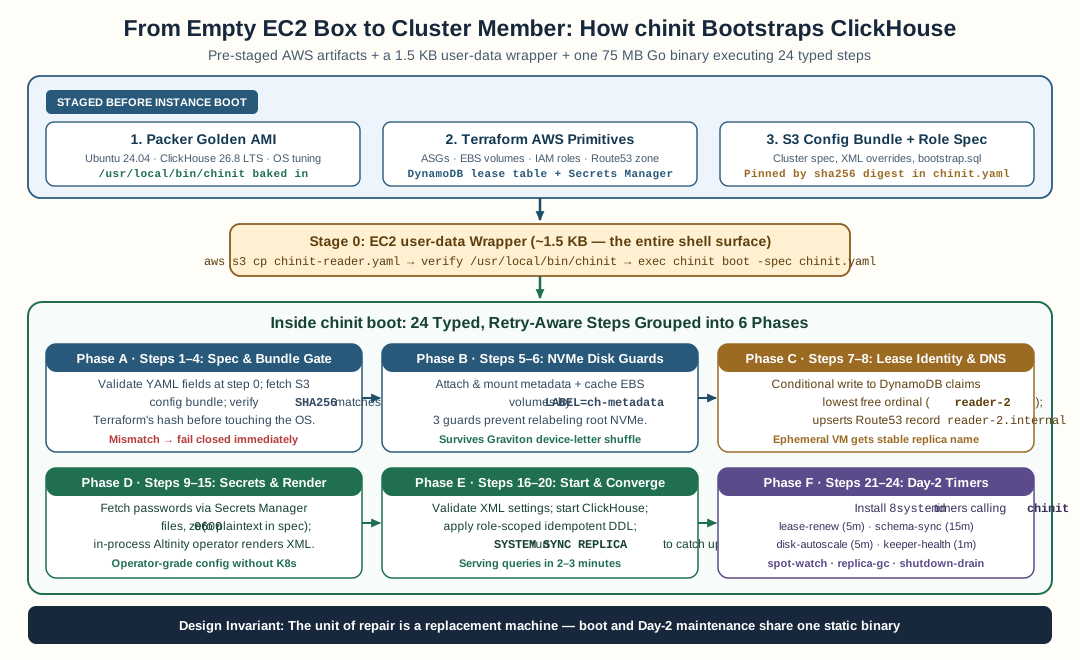
Staged AWS primitives (Packer AMI, Terraform resources, SHA256-pinned S3 bundle) feed a 1.5 KB user-data wrapper that execs chinit boot through 24 typed steps across six phases.
flowchart TB
    subgraph STAGED["Staged before any node boots"]
        direction LR
        P["Packer<br/>golden AMI:<br/>ClickHouse 26.8 LTS, backup tool,<br/>agents, OS tuning, chinit itself"]
        T["Terraform<br/>ASGs, EBS volumes, IAM roles,<br/>S3 bundle + role specs, DynamoDB<br/>lease table, Route53 zone"]
        C["The config bundle<br/>S3: XML configs, the cluster spec,<br/>bootstrap DDL — SHA256-pinned"]
    end
    STAGED --> LAUNCH
    subgraph LAUNCH["At boot (this post)"]
        W["user-data wrapper<br/>~1.5 KB"] --> CH["chinit boot<br/>24 typed steps"]
    end
    CH --> UP["Serving cluster member:<br/>stable name, rendered config,<br/>replication joined, jobs scheduled"]
    style STAGED fill:#1f3a5c,color:#fff
    style UP fill:#2d5a27,color:#fff
The golden AMI. An AMI (Amazon Machine Image) is AWS’s term for a
disk template — boot a new EC2 (Elastic Compute Cloud — AWS’s virtual
machines) instance from an AMI and it starts with whatever was on that
disk. Packer builds
hours before launch: Ubuntu 24.04 LTS, ClickHouse 26.8 LTS pinned to
the exact version, clickhouse-backup,
the AWS CLI (command-line interface), the CloudWatch agent (AWS’s
metrics/logs shipper), OpenTelemetry Collector and Fluent Bit (open-source
log shippers, configured only if a remote endpoint exists), OS tuning
(THP off — transparent huge pages, a kernel feature whose page-gluing
work adds foreground latency to allocators; ulimit -n raised), and
chinit itself, downloaded at image-build time from its GitHub release
and checksum-gated. Baking all this is why a node goes from launch to
serving in two to three minutes instead of eight to twelve: the room
is pre-set; the guest only checks in.
The Terraform-staged runtime. Terraform (the open-source IaC tool; we run its drop-in fork OpenTofu) creates: the writer and reader ASGs with their launch templates (the machine definition an ASG copies per instance), the EBS (Elastic Block Store — AWS’s network-attached disks) volumes, the IAM (Identity and Access Management — AWS’s permission system) instance roles, the S3 config bundle, the DynamoDB (AWS’s key-value table store) lease table, and the Route53 (AWS’s DNS service) private zone. It also renders the role specs — the small YAML documents chinit consumes — and uploads them.
The config bundle. Everything the node must read at boot lives in one S3 prefix, versioned by content, with a SHA256 (a cryptographic digest — any byte change changes it) that Terraform computes and renders into the spec. That one number is the contract between the IaC and the boot: the node refuses a bundle whose digest does not match, so a stale tfvars file or an accidentally overwritten bucket fails loudly at step 1 instead of poisoning the fleet with a config the release does not vouch for.
Stage 0: the wrapper, deliberately boring
EC2 gives every instance a user-data script it runs at first boot —
capped at 16 KiB, which is far too small for any real bootstrap, and
far too unstructured to want one there anyway. The wrapper we ship is
about 1.5 KB and does exactly three things:
- Seeds the role spec.
aws s3 cpthe node’schinit-<role>.yamlfrom the bundle prefix to a local path — using the instance role, no credentials anywhere. The spec’s blob name embeds a hash of its own content, so a spec edit repoints the wrapper’s source and rolls the fleet. - Verifies the image contract. Checks
/usr/local/bin/chinitexists and is executable. A missing binary is an image-build failure, not something to work around at 3 a.m. - Execs the binary. One line:
exec chinit boot -spec
chinit.yaml -cloud aws
.
That is the entire shell surface of the system. If you are reading this with a 60 KB cloud-init script of your own, the single hardest question worth asking is: what in here is a one-time machine concern (the wrapper), and what is actually a typed, ordered pipeline (the binary)?
The spec: intent as data
The wrapper hands chinit a YAML document per role. A reader’s spec, abbreviated from the real one:
role: reader
identity_mode: lease
reader_hostname_prefix: reader-
reader_max: 4             # the ASG max — the claim ceiling
claimer_table_name: ch-node-claims
cluster_name: ch-cluster
dns_zone_name: ch-cluster.internal
config_bundle:
  bucket: ch-config-bucket
  prefix: bootstrap
  sha256: 6f02a9...       # Terraform's config_files_hash
disks:
  metadata_label: ch-metadata
  cache_label: ch-cache
secrets:
  default_password: ch-default-password   # NAMES, never values
  admin_password: ch-admin-password
network:
  subnet_cidr: 10.0.1.0/24
  admin_allowed_networks: ["10.0.0.0/16"]
Three properties make this the heart of the design:
- It is validated on load. Unknown role, missing table name, absent disk label, empty bucket — the boot fails at step 0 with the field named, not three minutes later as a database parse error.
- It carries secret names. The values are resolved at runtime through the provider (below); plaintext never rides in the spec, the Terraform state, or any template.
- The claim ceiling is the ASG max, not the live count.
reader_maxis the largest the fleet can ever be. Render today’s count and a scaled-out node has no identity to claim.
What chinit actually does: the twenty-four steps
Now the walkthrough — every step, what it does on AWS, and what happens when it fails. Two failure classes exist throughout: critical steps abort the boot (the ASG replaces the node — correct, because a node that cannot mount its metadata disk cannot self-heal) and best-effort steps log a loud warning and continue (the boot should complete; a peer being down mid-roll is normal fleet life).
Phase 1 runs its four poles in parallel — they are independent and IO (input/output) -bound, and the claim sweep can legally wait out a dead predecessor’s lease for many minutes, so paying the max of the poles instead of the sum matters.
1. fetch_config_bundle (critical). Downloads the bundle from S3
using the instance role’s IAM permission: the static XML configs
(network, TLS, storage), the cluster specification, the bootstrap DDL
(data definition language — the CREATE TABLE statements; see step
15), and re-installs the role spec alongside them. Then the gate:
recompute the SHA256 the way Terraform does and compare against the
spec’s pinned value. Mismatch is fatal without retry — a drifted
bundle is a release problem, not a transient one.
2. os_optimizations (critical). Re-applies the kernel settings
the image already baked: THP off, file-descriptor limits, a systemd
( Linux’s service manager) drop-in raising the server’s LimitNOFILE.
Idempotent — a second run is a no-op.
3. require_binaries (critical). Asserts the golden-image
contract: clickhouse-server, clickhouse-client, chinit — and on
AWS, the aws CLI. A missing binary means the wrong image booted, and
the node must be replaced, not patched.
4. mount_data_disks (critical). EBS volumes attach
asynchronously — a volume can be attached in the API and invisible
to the OS for another minute, and large volumes on fresh launches have
taken more than a minute to appear. This step resolves each volume by
its filesystem label (a name written into the disk’s superblock
when it was formatted — stable across the NVMe (Non-Volatile Memory
Express — the modern storage protocol EC2 exposes volumes as) device
renaming that burned us on
Graviton), mounts
the metadata disk, and best-effort mounts cache/keeper disks. A blank
volume gets formatted; a volume carrying a partition-table signature is
never touched.
5. settle_identity (critical). The step that makes replacement
work. The node claims a stable name — reader-2 — from the DynamoDB
lease table with one conditional write (“this name is absent, or its
lease expired”), sweeping the ordinal range under a deadline. It sets
the hostname (static and transient), upserts a Route53 A record in the
private zone, and persists the identity to the state file immediately
— later steps read it from there, never re-deriving. Keepers and the
backup replica instead derive identity from their static IP’s octet
(raft members should not lease names). The full protocol has its own
post.
6. retrieve_passwords (critical). Resolves each secret name
from the spec against AWS Secrets Manager (AWS’s managed secret store)
via the instance role, writing each value to a mode-0600 file. The
render step will read those files; nothing else ever sees the values.
7. configure_tls (critical). Places the TLS certificate, key,
and CA (certificate authority) chain — themselves secrets resolved in
step 6 — into the server’s TLS directory with correct ownership.
8. install_static_configs (critical). Validates and installs the
bundle’s static XMLs into /etc/clickhouse-server/config.d/ — and
retires files earlier generations shipped by hand. A config
directory is a derived artifact: a stale overlay from a previous
software generation merges with the new render and crashes the server,
so the boot treats drift as its own bug and deletes it.
9. configure_peer_hosts (critical). Writes /etc/hosts entries
for the live cluster members (from the lease table’s active claims —
not the reserved slots), because systemd-resolved’s stub resolver
mangles short names and replication addresses peers by theirs.
10. configure_server_env (critical). Writes the server’s
environment file: the S3 disk’s endpoint (from the spec’s data-bucket
field — an unset from_env URL is a guaranteed start failure, Code 36)
and timezone. One AWS-shaped note from the
portability audit: this gate
is provider-aware — the endpoint is an S3-disk requirement, and on a
cloud whose disk config carries its endpoint inline, the step correctly
writes nothing.
11. render_node_config (critical). The step that replaces the
60 KB of hand-templated XML. chinit calls the operator’s own
rendering library — the same in-process code the
Altinity operator
uses on Kubernetes — to render the node’s full configuration from the
cluster specification: the macros (name substitutions like
{replica} that expand to the node’s settled identity), the
remote_servers cluster inventory (live claims only — a
reserved-but-vacant slot would put an unreachable peer in every
distributed query), users and profiles, and per-node settings. This is
why order is load-bearing: identity (step 5) must settle before
anything renders, or the macros bake in an ephemeral ip-* name and
every part the node registers is filed under a stranger’s identity.
12. configure_keeper (critical, keepers only). Renders the
single-file Keeper configuration (raft ports, log and snapshot paths)
from the bundle’s keeper spec and clears stale coordination state —
a leftover raft log from a previous instance is a split-brain
invitation. Other roles no-op.
13. write_node_env (best-effort). Snapshots the settled identity
into an environment contract file for legacy consumers; chinit’s own
subcommands read the JSON state file instead.
14. start_clickhouse (critical). Enables and starts the server,
waits for its HTTP ping. Keepers skip — they run clickhouse-keeper,
not the server. A crash loop here is a config problem, and the boot
log names the step that produced each file — exit code 347 is a
config-merge poison, 36 is a parse failure; triage is a two-minute
read.
15. bootstrap_schema (best-effort). Executes the bundle’s
bootstrap DDL — every CREATE TABLE IF NOT EXISTS with the node’s own
macros — so a fleet that churned completely still re-materializes
its own tables. Best-effort by design: an existing-table conflict is
the normal convergence case (log and continue), and schema sync (step
18’s unit) remains the heal path.
16. health_gate (best-effort — deliberately). Fans a health
check across the live-claims inventory and logs the verdict, never
blocking. A reader booting mid-roll while a peer is down must still
join; a fatal gate here wedges the ASG in a boot-replace-boot loop.
This one flag cost a live wedged fleet to learn.
17. prometheus_reload (best-effort). SYSTEM RELOAD CONFIG,
then verifies the server’s Prometheus (the open-source metrics
exposition format) endpoint answers on localhost:9363 — with a
service-restart fallback.
18. install_units (critical). Installs the recurring jobs as
systemd units whose ExecStart lines are chinit subcommands — the
maintenance jobs are the same binary, so there is no second script
to drift:
| Unit | Cadence | What it does |
|---|---|---|
replica-sync.service |
per boot | SYSTEM SYNC REPLICA on every replicated table |
schema-sync |
hourly | propagate table definitions from peers, prune stale self-registrations |
lease-renew |
every 5 min | renew the identity lease (a failed renewal re-claims its own ordinal — the replacement-race self-heal) |
disk-autoscale |
every 5 min | grow the EBS data volume + ext4 filesystem online when effective free space (the keep_free_space-aware number, not df) drops below the floor |
keeper-health |
every minute | keeper nodes: probe the ensemble, publish keeper_up |
| dead-replica / orphaned-data GC | weekly | the writer holding ordinal 0 drops registrations and data for names gone from the live-claims set |
19. configure_backup (critical). Writes the clickhouse-backup
configuration against the backup S3 bucket; the backup replica (a
cheap, query-excluded node) additionally gets the daily backup timer.
20. configure_monitoring / **21. configure_cloudwatch
(best-effort).** OTEL/Fluent Bit configs when a remote log endpoint is
configured; on AWS, the CloudWatch agent config — node metrics plus
the :9363 Prometheus bridge that turns the server’s own metrics
into CloudWatch datapoints, with role-split namespaces (ClickHouse/Server
vs ClickHouse/Keeper). A node invisible to alarms is a node whose
outage you learn about from users; this step exists because we
learned that with a full-day outage whose 2,328 errors existed only
on disk.
22. install_spot_watch (best-effort, readers). Installs the
interruption watcher: poll EC2’s metadata endpoint for the
spot-reclaim notice (a 2-minute warning), and on receipt run the
time-budgeted drain — stop replication queues, stop distributed
sends, release the lease, release DNS.
23. install_shutdown_drain (critical). The belt to the
suspender above: a systemd unit whose ExecStop runs the drain on
every shutdown path — ASG scale-in, EC2 health replacement, operator
stop — because instance termination without the ASG hook otherwise
leaves stale DNS records and leases behind. A reboot guard declines
the drain: identity survives a reboot.
24. boot_finished (critical). Writes the marker file and the
[TIMING] summary line — the exact format the fleet’s health
verification greps. The node is now a serving member: stable name,
rendered config, replication joined, maintenance scheduled.
What the cluster is, once four roles have done this
Walk the whole thing end to end and the definition lands: a bootstrapped cluster is one where the state that matters lives outside every machine — the parts in S3, the schema in the bundle and Keeper, the membership in the lease table, the config in one versioned prefix — and each machine is a converged, disposable view over that state. That is what makes replacement the remediation: a dead node is not a loss, it is a cache miss.
flowchart LR
    subgraph DURABLE["Durable state (outside every node)"]
        S[("S3: parts + prefixes<br/>per stable replica name")]
        K[("Keeper: raft quorum<br/>replica registrations")]
        D[("DynamoDB: live claims<br/>who holds which name")]
        B[("S3 bundle: one truth<br/>configs + schema + specs")]
    end
    subgraph EPHEMERAL["Disposable, converged views"]
        W["writer-0..2<br/>ASG, lease identity"]
        R["reader-0..3<br/>ASG + spot, lease identity"]
        KP["keeper-0..2<br/>fixed VMs, static identity"]
    end
    B --> CH["chinit boot<br/>renders each node<br/>against the same truth"]
    CH --> W & R & KP
    W & R --> S & K
    KP --> K
    W & R --> D
    style DURABLE fill:#1f3a5c,color:#fff
    style EPHEMERAL fill:#1f3a5c,color:#fff
And the payoff is operational, not aesthetic. A spot reader is reclaimed: the watcher drains it, its lease expires, the ASG launches a replacement, chinit boots it, it re-claims its old name, re-renders, re-syncs its catalog from peers — minutes, no human. A tfvars edit rolls the bundle hash, the fleet’s user-data changes, Terraform replaces instances deliberately, and the new nodes refuse nothing because the bundle they fetch is exactly the one the release pins. The bootstrap is no longer a script you hope works; it is a contract the fleet enforces.
If you are building this yourself
The pieces, in the order that avoids relearning our findings:
- Bake before you boot. A golden image with the database pinned is the difference between 2-minute and 10-minute replacement — and on a churning fleet, that is query capacity.
- Make user-data a wrapper, and make it boring. If your bootstrap is a big script in user-data, it will be the least-reviewed code you own. Move the pipeline into something typed and testable; the 16 KiB cap is doing you a favor by forcing the boundary.
- Settle identity before anything renders it. The
{replica}-macro class of bug — an ephemeral hostname baked into durable paths — is silent and expensive; the ordering is the fix. - Gate your configuration delivery on a digest both sides compute. One number in the spec, recomputed at fetch, and a drifted bundle becomes a step-1 failure with a named error.
- Treat the config directory as derived. Whatever renders node config must also prune what past generations left there.
- Make maintenance jobs the same binary. The instant the recurring jobs fork from the boot logic, they drift — and the self-healing arc is largely the story of closing that gap.
The pattern is not ClickHouse-specific and not AWS-specific: any stateful fleet on replaceable machines needs exactly this — a spec, a checksum-gated bundle, a lease on identity, a render from one truth, and recurring convergence. chinit is that pattern, open source, with the scars included.
FAQ
What does bootstrapping a ClickHouse cluster mean?
Turning empty cloud machines into cluster members with stable identities, correct configuration, mounted storage, resolved secrets, and running services — repeatedly, on demand, without a human. On AWS that spans: baking a golden image with the database pre-installed, launching instances with a small startup script in user-data, having the node fetch its own configuration, claim a stable name from a lease table, render the database's configuration files, start the server, verify health, and schedule its own maintenance jobs. A cluster (not just one database) additionally needs coordination: members must discover each other, a Keeper quorum must exist, and replication must connect them.
What is chinit?
An open-source Go bootstrapper for self-managed database nodes. It is one static binary (~75 MB) that reads a small YAML role spec, detects which cloud it is running on, fetches a checksum-gated configuration bundle from object storage, and then executes a typed, ordered, retry-aware pipeline — mount disks, claim identity, resolve secrets, render configuration, start the server, install recurring maintenance as its own subcommands. The same binary serves every role (writer, reader, keeper, backup) and every supported cloud; the role and the cloud are data, not forks.
Why is user-data only a wrapper instead of the whole bootstrap?
EC2 caps user-data — the script an instance runs at first boot — at 16 KiB, and a full bootstrap is far bigger than that. More importantly, a big shell script is untestable, untyped, and drifts. The wrapper is deliberately tiny (~1.5 KB): it seeds the node's role spec from S3, verifies the bootstrapper binary baked into the image is present, and execs it. Everything else lives in the binary and the configuration bundle — versioned, checksummed, and reviewable.
Why does a node need to 'claim' an identity? Isn't the hostname enough?
No — the platform-assigned hostname (something like ip-10-0-1-97) is ephemeral: it changes every time an Auto Scaling Group replaces the instance. But ClickHouse replication keys on names that must outlive the machine — replica paths in Keeper, per-replica prefixes in S3, configuration macros. A replacement node must come back as the same name (writer-2, reader-3), so chinit claims that name from a lease table (DynamoDB on AWS) with a single conditional write, renews it on a timer while it lives, and releases it when the node drains. The stable name is a lease, not a property of the machine.
How do passwords reach the node without being in the spec or the user-data?
The spec carries secret NAMES only. At boot, chinit resolves each name through AWS Secrets Manager using the instance's IAM role — a permission attached to the machine itself, no static credentials anywhere — and writes each value to a file readable only by the database user (mode 0600). The configuration render then reads the values from those files. Plaintext never touches the spec, the Terraform state, the rendered configuration, or the boot log.
What does the node do after the boot finishes?
The boot installs the recurring maintenance as systemd units whose ExecStart lines are chinit subcommands: schema sync (propagate table definitions from peers, hourly), replica sync (SYSTEM SYNC REPLICA, per boot), lease renewal (every 5 minutes), disk autoscale (grow the data volume before effective free space runs out, every 5 minutes), keeper health (every minute, on keepers), dead-replica and orphaned-data garbage collection (on the writer holding ordinal 0), a spot-interruption watcher (on readers), and a shutdown drain that releases DNS and the lease before the instance dies. The maintenance jobs are the same binary — there is no second script to drift.
Doesn't Kubernetes's operator already solve this?
On Kubernetes, yes — the operator renders configuration and manages pods. This stack runs ClickHouse directly on EC2 (the series covers why), so the bootstrapper brings the operator's rendering code with it: chinit calls the same in-process library the Altinity operator uses on Kubernetes to render node configuration from the cluster specification. You get operator-grade rendering without the cluster.
Stay in the loop — production notes on AI agents, workflows, and SRE.
Low volume — new posts and curated reading lists. Unsubscribe anytime.