Graviton Roulette: The Day NVMe Device Names Broke Our Boot (and the Disk-Label Guard That Saved Root)
ClickHouse on AWS: Self-Managed from First Principles · Part 30
Here is a sentence you never want to read in a boot log:
ERROR: critical step mount_data_disks failed: fatal: metadata disk: relabel
/dev/nvme1n1 to ch-metadata: e2label: Bad magic number in super-block while
trying to open /dev/nvme1n1
Found a gpt partition table in /dev/nvme1n1 — boot aborted
Read it again with the context that matters: on this instance,
/dev/nvme1n1 was the root disk. The bootstrapper had picked the root
disk as the metadata volume, resolved it by candidate device name, and was
one e2label away from writing a filesystem label onto the disk that holds
the operating system. The only thing that saved the node was an accident:
the root disk carries a GPT partition table, e2label refused the
non-ext4 magic number, and the step aborted loudly instead of corrupting
/.
This post is about how that happened, why Graviton made it likely, and the three guards a boot-time disk step needs so the next enumeration flip is a non-event.
Key takeaways
- Graviton’s NVMe enumeration order is not stable across instance types.
/dev/nvme1n1can be your data volume on one shape and the root disk on the next launch of another. Device names are not identity. - Resolve disks by filesystem label (
blkid -L), never by device name. Labels live in the superblock and survive any re-enumeration; fstab should mountLABEL=entries for the same reason. - Device-name candidates are only a first-boot fallback — and they must skip
any device whose
blkidsignature is a partition table (TYPE=dosorTYPE=gpt). That signature is the shape of an OS disk. - Async EBS attach can take minutes on fresh launches with large volumes. A mount step needs a patient, deadline-bounded retry window — a 60-second budget aborts boots that would have succeeded at minute two.
How EBS becomes NVMe, and why the names shuffle
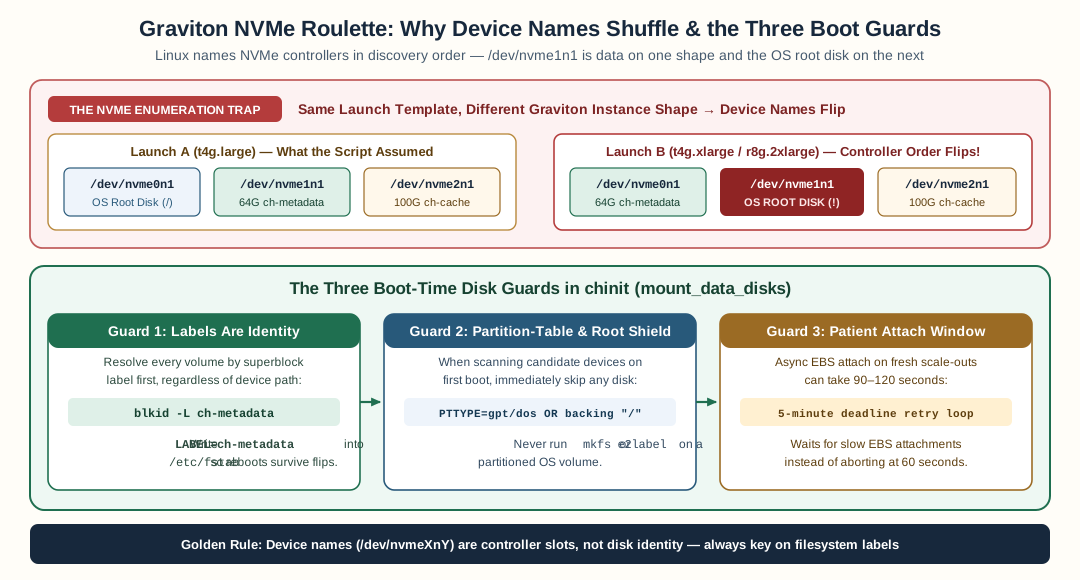
NVMe device names (/dev/nvme0n1, /dev/nvme1n1) depend on controller discovery timing rather than volume role; chinit guards root by resolving superblock labels first, rejecting partitioned or root-backing devices, and waiting up to five minutes for async EBS attachment.
On modern EC2, every EBS volume shows up as an NVMe device. The Linux NVMe
driver names them in the order it discovers them — nvme0n1, nvme1n1,
nvme2n1 — and that order is a function of controller enumeration timing,
not of anything you configured in the volume.
For a long time our stack got away with the assumption
“/dev/nvme1n1 is the 64 GiB metadata volume”:
t4g.large launch:   nvme0n1 (root)      nvme1n1 (metadata)   nvme2n1 (cache)
t4g.xlarge launch:  nvme0n1 (metadata)  nvme1n1 (root!)       nvme2n1 (cache)
r8g.2xlarge launch: nvme0n1 (metadata)  nvme1n1 (root!)       nvme2n1 (cache)
The same launch template, three different disks answering to the same name. Nothing was wrong with any volume — the name simply did not survive the instance-type change. The assumption baked into the bootstrap broke the moment the fleet moved to a shape whose controllers enumerate differently.
The first symptom was confusing rather than catastrophic: on some launches the “metadata disk not found” error, because the candidate list no longer pointed at the metadata volume and the label lookup found nothing. The second symptom was the near-miss at the top of this post: the candidate list pointed at root, and the step tried to relabel it.
The three guards
Guard one: labels are identity
The metadata volume is created with a filesystem label at format time. That label lives in the superblock — it is written to the volume’s bytes, not to its device name. So the resolution order on every boot is:
flowchart TB
    S["Boot: resolve metadata disk"] --> L{"blkid -L ch-metadata<br/>(resolves by label?)"}
    L -->|yes| M["mount LABEL=ch-metadata<br/>fstab entry survives churn"]
    L -->|no — first boot only| C{"Device-name candidates:<br/>does blkid show a<br/>partition table (dos/gpt)?"}
    C -->|"yes — OS disk shape"| SKIP["skip this candidate<br/>never relabel, never format"]
    C -->|no — blank or labeled fs| F["adopt: format blank with -L<br/>or relabel an unlabeled fs"]
    F --> M
    style SKIP fill:#ffe0e0
    style M fill:#e0ffe0
blkid -L ch-metadata returns the right device whatever the enumeration
did. Repeat boots never even look at candidate names. Device-name
candidates exist solely for the first-boot case — the volume is blank, no
label to resolve — and that is where the second guard lives.
Guard two: partition tables are hands-off
A blkid probe of the root disk returns a signature like:
/dev/nvme1n1: PTUUID="a3187faf-..." PTTYPE="gpt"
PTTYPE — a partition table type — is the tell. It means the first bytes
of this disk are a partition map, not a filesystem. That is the shape of
an operating system disk or a volume from a prior tenant. The bootstrap’s
candidate loop now skips any device whose probe answers TYPE=dos or
TYPE=gpt, and only ever adopts blank devices (safe to mkfs) or
unlabeled-but-formatted ones (safe to e2label).
The failure this guard replaced was silent in the other direction: a
blank probe on the root disk would have meant mkfs.ext4 -F — a
forced format — straight over the operating system. The GPT refusal was
luck. The guard makes it policy.
Guard three: patience for async attach
The third failure mode needs no enumeration flip at all. EBS volumes attach asynchronously after instance launch, and on fresh scale-outs with large volumes, attach can take minutes. We watched a 64 GiB metadata volume surface at minute two — comfortably after a mount step whose retry budget was sixty seconds. The step gave up, the boot aborted, cloud-init recorded an error, and the node sat half-booted until a human re-ran the bootstrap.
The fix is a patient policy: a five-minute, deadline-bounded wait on the mount step (sixty attempts with capped backoff). That is long enough to outlast real attach latency, short enough not to wedge an autoscaling group’s instance refresh (whose warmup is 300 seconds anyway). And it keeps the classification honest: a missing volume is retryable — it may still be attaching — while a present-but-unmountable volume (corrupt filesystem, device error) is fatal, because no retry cures that.
Why fstab should mount LABEL= too
The same reasoning applies after the mount. An fstab entry like:
LABEL=ch-metadata /var/lib/clickhouse ext4 defaults,nofail 0 2
finds the volume at any device name on any instance type. A
/dev/nvme1n1 fstab entry works until the day the enumeration flips —
then silently fails to mount on the next boot, or worse, mounts the wrong
volume at your data path. nofail keeps a missing volume from blocking
boot entirely, which is the right failure mode for an optional cache and
the wrong one for metadata — so classify them: metadata is required, cache
degrades to a subdirectory, and neither should ever name a device.
The general rule
Device names are an accident of enumeration. Filesystem labels are a fact of the volume. The hierarchy every boot-time disk step should follow:
- Resolve by label — the only identity that survives instance-type changes, reboots, and controller quirks.
- Fall back to candidates only for blank disks — and then skip anything carrying a partition-table signature, because that disk belongs to an OS or a prior tenant, and neither should be in your blast radius.
- Wait longer than attach — a deadline-bounded retry on the mount step turns “volume not there yet” from a wedged boot into a one-minute patient pause.
The day after the guards shipped, the fleet rolled through the same
instance-type change that produced the root-disk near-miss — and the boot
log’s most interesting line was disk candidates: skipped 1 partitioned
device. That is what the fix looks like in production: the dangerous case
became a log line nobody needed to read.
FAQ
Why do EBS volumes change NVMe device names between instance types?
EC2 exposes EBS volumes as NVMe devices, and the Linux NVMe driver enumerates them in attach-and-discovery order — which varies with instance type, boot timing, and how many devices the type exposes. On one t4g shape /dev/nvme1n1 is the metadata volume; on an r8g launch of the same stack it is the root disk. Nothing is wrong with the volume; the name simply does not survive a type change.
How do you reliably find a specific EBS volume on Linux?
Resolve by filesystem label, not by device name. mkfs writes the label into the superblock, blkid -L label reads it back no matter which /dev/nvmeXnY the volume landed on, and fstab mounts with LABEL= entries survive enumeration churn. Device-name candidates are only a fallback for first-boot formatting — and they must be guarded against partition tables.
Why is relabeling a partitioned disk dangerous?
Because a partition table at offset zero means the disk belongs to an operating system or a prior tenant. Running e2label against it either fails loudly (a GPT table's magic number is not an ext superblock — that loud failure saved our root disk) or, on some layouts, relabels a partition's filesystem while the partition map stays intact. The rule a boot step must follow: a candidate carrying a partition-table signature is never adopted, never relabeled, never formatted.
What about the EBS volume that attaches late?
Give the mount step a patient retry window. Async EBS attach on large-volume launches can take minutes — a 64 GiB metadata volume on a fresh scale-out attached at minute two, well past a 60-second retry budget. The boot aborted, cloud-init recorded an error, and the node sat half-booted until a manual re-run. A five-minute deadline-bounded wait on the mount step closes the race without wedging the autoscaling group.
Stay in the loop — production notes on AI agents, workflows, and SRE.
Low volume — new posts and curated reading lists. Unsubscribe anytime.