Touching CAS Without Betting the Cluster: A Hands-On Staging Walkthrough
ClickHouse on AWS: Self-Managed from First Principles · Part 22
This is the field guide for the CDK-free path: adding Altinity Antalya’s content-addressed storage (CAS) to a self-managed ClickHouse cluster on Amazon Simple Storage Service (S3) without betting production on it. Everything here is either from the Antalya docs or from a real dev cluster rollout; where I got burned, the burn is included.
Key takeaways
- CAS is opt-in per disk, not per cluster. You can add it next to your existing disks and move data one partition at a time.
- The prerequisites are bucket properties, not instance sizes: versioning off, no object lock, conditional writes honored,
AbortIncompleteMultipartUploadlifecycle. - The failure mode that bites people is a mount that won’t start. That is a feature: CAS refuses to run on a bucket it cannot reason about.
- Verify with
system.cas_mounts,system.cas_gc_log, andsystem.parts— never with “the server started”.
0. What you will end up with
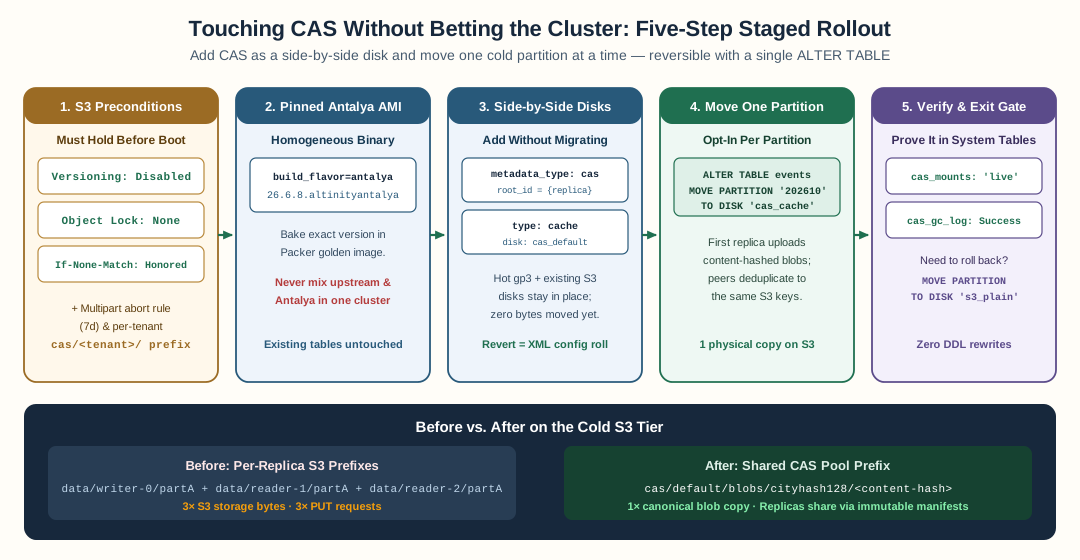
Add the cas and cas_cache disks alongside existing storage, verify S3 preconditions, and migrate one cold partition at a time with ALTER TABLE ... MOVE PARTITION.
flowchart TB
    subgraph Before["Before"]
        W1["writer: parts in data/default/writer-0/"] --> S3A[("S3 bucket")]
        R1["reader: same parts re-uploaded<br/>data/default/reader-1/"] --> S3A
    end
    subgraph After["After: CAS cold tier"]
        W2["writer"] --> CAS["cas pool: cas/default/<hash>"]
        R2["reader"] --> CAS
        CAS --> S3B[("S3 bucket, one copy")]
    end
Two disks get added, nothing is removed: a cas disk (metadata_type=cas) and a cas_cache wrapper. Your policies keep their hot local disk; the cold volume points at the cache wrapper.
1. Bucket preconditions — check these first
CAS’s mount-time capability probe is unforgiving by design. On AWS S3:
aws s3api get-bucket-versioning --bucket "$BUCKET"     # must be {} or Disabled
aws s3api get-object-lock-configuration --bucket "$BUCKET"   # must not exist
aws s3api get-bucket-lifecycle-configuration --bucket "$BUCKET"
# must include AbortIncompleteMultipartUpload (7 days is fine)
If versioning is on, the mount refuses to start and the server won’t boot with that disk in config. That is correct behavior — a delete marker over a live key would silently defeat every GC invariant the pool relies on. Fix the bucket, not the config.
Also decide the pool layout now: a single shared pool (cas/), a pool per tenant (cas/<tenant>/), or per shard (cas/<shard>/). Per-tenant is the right default for multi-tenant fleets; rebalancing pools later means moving data.
2. The build
Upstream ClickHouse does not have this code. You need the Antalya build:
# packer
packer build -var build_flavor=antalya \
             -var clickhouse_version=26.6.8.20004.altinityantalya \
             packer/clickhouse.pkr.hcl
The APT repo is https://builds.altinity.cloud/antalya-apt-repo (stable). Pin the exact version in your golden image and smoke-test clickhouse-server --version before the rollout. A mixed fleet — some nodes Antalya, some upstream — is unsupported, and the failure is silent at best.
3. The disk config
The minimal per-node shape (Terraform-rendered in the reference repo):
<clickhouse>
  <storage_configuration>
    <disks>
      <cas>
        <type>object_storage</type>
        <object_storage_type>s3</object_storage_type>
        <metadata_type>cas</metadata_type>
        <cas_server_root_id>{replica}</cas_server_root_id>
        <endpoint from_env="CH_S3_ENDPOINT"/>
        <endpoint_subpath>cas/default/</endpoint_subpath>
        <use_environment_credentials>true</use_environment_credentials>
        <skip_bucket_creation>true</skip_bucket_creation>
        <http_keep_alive_timeout>30</http_keep_alive_timeout>
        <http_keep_alive_max_requests>10000</http_keep_alive_max_requests>
      </cas>
      <cas_cache>
        <type>cache</type>
        <disk>cas</disk>
        <path>/var/lib/clickhouse/disks/cas_cache/</path>
        <max_size>17179869184</max_size>   <!-- raw bytes, not "16Gi" -->
        <cache_on_write_operations>true</cache_on_write_operations>
      </cas>
    </disks>
    <policies>
      <cas_default>
        <volumes>
          <hot><disk>default</disk><volume_priority>1</volume_priority></hot>
          <cold>
            <disk>cas_cache</disk>
            <volume_priority>2</volume_priority>
            <perform_ttl_move_on_insert>false</perform_ttl_move_on_insert>
            <prefer_not_to_merge>true</prefer_not_to_merge>
          </cold>
        </volumes>
        <move_factor>0.1</move_factor>
      </cas_default>
    </policies>
  </storage_configuration>
</clickhouse>
Notes that will save you an hour:
cas_server_root_id={replica}— one stable identity per node, from the same macros that drive replication. Never reuse an id across nodes that share a pool.- Policy volumes point at the cache disk, never at
casdirectly. max_sizeis raw bytes."16Gi"is a parse error in this element.- Keep the existing
tiered/tenant_*policies in place. CAS is additive until you move a partition.
4. Enable, boot, verify the mount
Roll the fleet (new AMI or config-refresh). Then, on every node:
SELECT disk, server_root_id, state, is_leader, pending_reclaim
FROM system.cas_mounts;
Expected: one row per CAS disk, state = 'live'. Anything else and you stop here and read the log — CORRUPTED_DATA means the identity or the bucket is wrong; fix that, not the query.
Also check the GC log exists and is not erroring:
SELECT outcome, count()
FROM system.cas_gc_log
WHERE event_type = 'Finish'
GROUP BY outcome;
5. Move one partition, not the table
Do not flip storage_policy in place — StoragePolicy::checkCompatibleWith rejects a policy that does not contain the old disks. Adopt CAS per partition:
ALTER TABLE default.edge_requests
  MOVE PARTITION '2026-10-01' TO DISK 'cas_cache';
Watch it land:
SELECT partition, disk_name, count()
FROM system.parts
WHERE table = 'events' AND active
GROUP BY partition, disk_name
ORDER BY partition;
And confirm the pool grew instead of the per-replica prefix:
aws s3 ls s3://ch-int-dev-clickhouse-data/cas/default/ --recursive | head
aws s3 ls s3://ch-int-dev-clickhouse-data/data/default/ | head
Expect far fewer bytes in the per-replica tree after a full re-tier.
6. Rollback
Before any MOVE, rollback is a config revert. After MOVEs:
ALTER TABLE default.edge_requests MOVE PARTITION '2026-10-01' TO DISK 's3_cache'; -- or disk_default
then set cas_config.enabled = false and re-apply. Do not delete cas/ from the bucket until SELECT count() FROM system.parts WHERE disk_name LIKE 'cas%' returns 0 and no node mounts the pool.
7. The order I would run it in a real cluster
- Reproduce on a disposable table on a dev cluster. Break it deliberately (bad
cas_server_root_id, versioned bucket) and see the refusal. - Verify writer→reader replication and
ON CLUSTERDDL on that cluster first — CAS sits on top of a healthy replication layer, it does not fix an unhealthy one. (Ours was broken by phantom hosts in the renderedremote_servers; fix that class of bug before CAS work starts.) - Enable on one reader, then one writer, watching
cas_gc_log. - Move one cold partition of a low-traffic table. Watch for a day.
- Extend by tenant. Never big-bang.
That is the whole playbook. What actually breaks along the way is the next post.
References
- Altinity Antalya CAS docs: https://docs.altinity.com/altinityantalya/ (
quick-start,bucket-requirements,configuration) - Terraform shape used here: a
cas_configroot variable gatingcas_*disk/policy templates, an IAM grant scoped tocas/*on the data bucket, and acas_config.enabled = falsedefault. Config renders only when the flag is on, so a plaintofu applychanges nothing on an existing fleet.
FAQ
Can I try CAS on my existing cluster without migrating data?
Yes, in the shape this post describes: add the CAS disks alongside the existing ones, keep the current table policies untouched, and adopt CAS per table with ALTER TABLE ... MOVE PARTITION. Nothing moves until you move it; reverting before any MOVE is a config revert.
What bucket settings does CAS require?
Versioning must be disabled, no object lock and no default retention, and an AbortIncompleteMultipartUpload lifecycle rule. The bucket must also honor conditional writes (If-None-Match / If-Match). CAS refuses to mount on a bucket it cannot trust.
Does MOVE PARTITION copy or relink the bytes?
On a same-pool move between cache wrappers around the same pool it is a metadata operation plus relink. Moving onto the pool from a non-CAS disk (your first migration) still copies bytes once — after that, the replica no longer stores its own copy.
How do I know CAS is actually working and not silently falling back?
Check system.cas_mounts (state must be 'live'), system.cas_gc_log (no Error outcomes), system.parts (disk_name shows cas_cache_*), and the S3 bucket itself — blobs appear once under the pool prefix regardless of replica count.
Stay in the loop — production notes on AI agents, workflows, and SRE.
Low volume — new posts and curated reading lists. Unsubscribe anytime.