Stop Re-Investigating the Same Alert
A Slack follow-up about an alert does not always require another full site reliability engineering (SRE) AI investigation. Reusing a recent result can save time and model usage, provided operators can request a fresh look when conditions change.
The incident patterns below are composite and anonymized. Counts are rounded. Names, IDs, and infrastructure details are fictionalized to protect customer confidentiality.
The Acme Commerce pattern
Composite story, drawn from production debug export analysis:
Alert: worker-service errors on invoice jobs missing a required tenant_id field after a bad release.
Behavior: The alert fired on an hourly cycle. On-call @mentioned the bot in #incidents-prod with “why is this still firing?” Each mention launched a full investigate workflow. Session after session rediscovered the same KeyError pattern and the same release candidate.
Outcome: Roughly twenty completed investigations on one alert ID in a week. In the reviewed sessions, repeated mentions launched work that rediscovered the same pattern; token usage and waiting time grew with those reruns.
The repeated diagnosis was not necessarily wrong. The entry path treated each human message as a request to investigate from scratch.
What reuse-first looks like
The decision path shows when a follow-up can reuse a completed RCA and when changed evidence or an explicit request should start a fresh investigation.
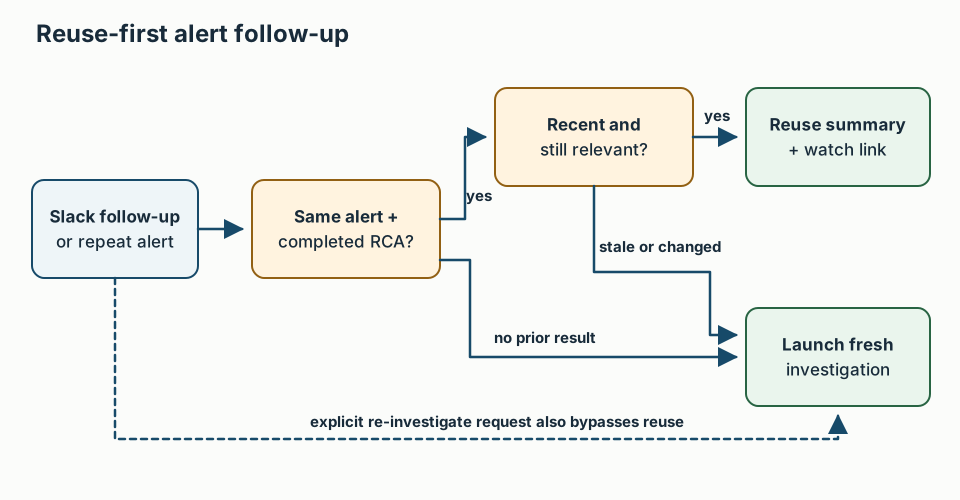
When a recent completed root-cause analysis (RCA) exists for the alert (a default cooldown on the order of hours):
- Check that the alert identity matches, the prior run is complete, and its evidence is still relevant.
- Answer from that investigation summary instead of launching
investigate-alert. - Include the watch / session link so the operator can inspect the evidence and its age.
- Start a new run when the operator asks — “re-investigate,” “from scratch,” “force new” — or when new symptoms, a changed deployment, or an expired result make reuse unsafe.
A slash command such as /reinvestigate makes an explicit override easy to recognize. “Please check again” is ambiguous: show the earlier result and offer a fresh run, or use follow-up questions to distinguish a request for new evidence from a request for the existing answer. A simple intent regex cannot by itself detect changed conditions.
If you lead an SRE team
- Chart investigations per alert ID weekly. Spikes are a reason to review whether the product is redoing work or operators are responding to changed evidence
- Train the channel: follow-ups get the prior summary; say “re-investigate” when you want a new dig
- Count time-to-first-useful-answer on first investigate, then reuse latency on follow-ups — different service targets
If you ship the agent platform
- Short-circuit on recent terminal status before spawning collectors
- Support an explicit fresh-run command; if using an intent regex for natural-language requests, log and review ambiguous matches
- Stamp prior investigation id + finished time into the reuse prompt and require it to distinguish the prior finding from any new observation
Related
- Series opener: Service Rendered Efficiently
- Next: Slack Is a Triage Board, Not a Log Dump
- Token budgets: LLM tokenomics
- Checklist: SRE as service
Acknowledgments. Reuse-first launch policy lessons from shipping Aiden SRE chat investigation. Customer details composite.
If you are building AI for incident triage, Find me on GitHub or LinkedIn.
FAQ
Why do AI SRE agents re-investigate the same alert?
Hourly alert cycles and Slack follow-ups often launch a full investigate workflow even when a completed RCA already exists. Without a reuse-first policy, every @mention looks like a new job.
What should operators do instead of re-running investigate?
Check the age and relevance of the prior result; use its summary and watch link when it still applies. Request a fresh run when evidence or circumstances change.
What metric should SRE leads track?
Investigations per alert ID per week — not just model accuracy. Twenty full digs on one alert warrants a review of launch policy and whether new evidence justified those runs.
Stay in the loop — production notes on AI agents, workflows, and SRE.
Low volume — new posts and curated reading lists. Unsubscribe anytime.