Don't Ship Tarballs to a Column Store: ClickHouse Compression from S3Queue to MergeTree
ClickHouse on AWS: Self-Managed from First Principles · Part 39
When a cost audit on a 30 TB/day log pipeline flags a line item like:
| Line Item | Basis (30 TB/day = 912 TB/mo uncompressed) | 3-Day Buffer | 45-Day Default |
|---|---|---|---|
Raw .log.gz S3 retention |
~5 TB/day gzipped (~6× ratio) × $23/TB-mo |
$345/mo | $5,175/mo |
the immediate engineering instinct is to ask: “Can we use a better compression format than .tgz or .gz that ClickHouse understands natively?”
The answer is yes — switching from gzip to Zstandard (.zst) typically doubles compression on structured logs (~6× → ~12–15×) while using a fraction of the CPU.
But if you open the ClickHouse source tree and trace how a byte actually travels from an S3 landing bucket into a ReplicatedMergeTree part, you quickly realize there isn’t one compression boundary in a ClickHouse pipeline. There are three. Confusing them is how teams end up wrapping single files in .tgz tarballs, burning serverless CPU on gzip -9, leaving staging buckets completely uncompressed, or wondering why a 15×-compressed table is still generating $1,400/month in S3 PUT requests.
Here is the anatomy of all three compression stages, straight from the ClickHouse C++ source.
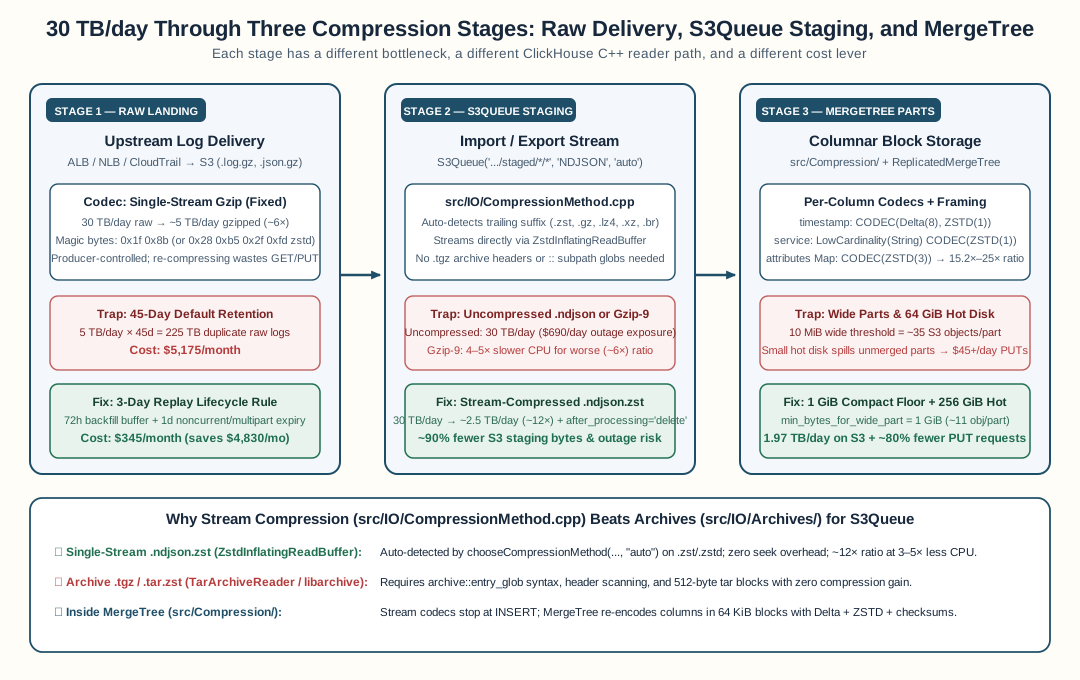
Stage 1: Raw Delivery in S3 (.log.gz) — Don’t Re-Compress What You Can Expire
In most cloud log pipelines, the first S3 prefix is an immutable landing zone written by someone else’s service principal — AWS ALB/NLB access logs, CloudTrail trails, CDN logs, or third-party forwarders.
Two facts govern this layer:
- Managed cloud producers hardcode single-stream
.gz. AWS load balancers and CloudTrail deliver.log.gzand.json.gzfiles at roughly a6×compression ratio (30 TB/dayraw →~5 TB/daygzipped). You cannot configure ALB to emit.zst. - Re-compressing raw landing files in place is a negative-ROI trap. Transcoding
5 TB/dayof.log.gzinto~2.5 TB/dayof.log.zstjust to hold it in S3 requires reading5 TB/day, burning compute to gunzip + zstd, and paying Tier-1 S3PUTfees (S3 StandardPUT/COPY/LISTAPI tier at$0.005per 1,000 requests) on every object.
Once your ingest pipeline normalizes those logs into ClickHouse (and clickhouse-backup snapshots the table nightly), the raw landing zone has only one job: a 72-hour replay buffer in case a parser rule has a bug.
- At 45 days of retention,
5 TB/day × 45 × $23/TB-mois $5,175/month of duplicate data. - At 3 days of retention (plus a 1-day
noncurrent_version_expirationandabort_incomplete_multipart_uploadrule on versioned buckets), that same replay safety costs $345/month — saving $4,830/month with a one-line S3 lifecycle change.
Where codec choice does matter in Stage 1 is when your own collectors or agents write raw files, or when your normalizer reads them. Instead of trusting file extensions (.gz vs .zst vs .lz4), a resilient streaming reader peeks up to the first four magic bytes of the buffered stream (2 bytes for gzip, 4 bytes for Zstd and LZ4):
| Codec | Magic Bytes (Hex) | Go / C++ Streaming Reader |
|---|---|---|
Gzip (.gz, .gzip) |
1F 8B |
pgzip.NewReader / LibdeflateInflatingReadBuffer |
Zstandard (.zst, .zstd) |
28 B5 2F FD |
zstd.NewReader / ZstdInflatingReadBuffer |
LZ4 Frame (.lz4) |
04 22 4D 18 |
lz4.NewReader / Lz4InflatingReadBuffer |
Peeking the stream header lets the same normalizer unwrap gzipped CloudTrail envelopes ({"Records":[...]}) and Zstd-compressed custom log streams without buffering the file in memory or relying on the filename.
Stage 2: Staged Files for S3Queue and s3() — Why .ndjson.zst Beats .tgz and .gz
In a decoupled ingest architecture, your normalizer parses raw logs into structured NDJSON (JSONEachRow) batches (150–200 MB uncompressed per batch) and writes them to a staging prefix that ClickHouse’s S3Queue engine drains. The running example for the rest of this post is a CDN edge access-log pipeline — one staging queue table per environment:
CREATE TABLE default.edge_staging
(
    `id` String,
    `timestamp` String,
    `pop` String,
    `payload` String,
    `logset` String
)
ENGINE = S3Queue(
    'https://my-staging-bucket.s3.us-west-2.amazonaws.com/staged-logs/*/*',
    'NDJSON',
    'auto'
)
SETTINGS
    mode = 'unordered',
    after_processing = 'delete';
That third argument — 'auto' — is passed directly to chooseCompressionMethod in src/IO/CompressionMethod.cpp.
What ClickHouse’s chooseCompressionMethod Actually Supports
In src/IO/CompressionMethod.h and src/IO/CompressionMethod.cpp, ClickHouse defines the import/export stream codecs and the exact file extensions that 'auto' recognizes:
// src/IO/CompressionMethod.cpp
std::span<const std::string_view> getFileSuffixesForCompressionMethod(CompressionMethod method)
{
    static constexpr std::string_view gzip[] = {"gz", "gzip"};
    static constexpr std::string_view zlib[] = {"deflate"};
    static constexpr std::string_view brotli[] = {"br", "brotli"};
    static constexpr std::string_view xz[] = {"xz", "lzma"};
    static constexpr std::string_view zstd[] = {"zst", "zstd"};
    static constexpr std::string_view lz4[] = {"lz4"};
    static constexpr std::string_view bz2[] = {"bz2"};
    static constexpr std::string_view snappy[] = {"snappy"};
    // ...
}
Even ClickHouse’s own HTTP content-negotiation preference order in chooseHTTPCompressionMethod (CompressionMethod.cpp) ranks them in order of practical efficiency:
zstd(.zst,.zstd) →ZstdInflatingReadBuffer(levels1..22)br(.br,.brotli) →BrotliReadBufferlz4(.lz4) →Lz4InflatingReadBuffer(levels1..12)snappy(.snappy) →HadoopSnappyReadBuffer/SnappyFramedReadBuffergzip/deflate(.gz,.gzip,.deflate) →LibdeflateInflatingReadBuffer(levels1..12)xz(.xz,.lzma) →LZMAInflatingReadBufferbz2(.bz2) →Bzip2ReadBuffer
Here is how the main contenders behave on 30 TB/day of normalized NDJSON logs:
| Codec | Extension | Typical NDJSON Ratio | Staged Volume @ 30 TB/day | Write CPU (Producer) | Read CPU (ClickHouse) | Verdict |
|---|---|---|---|---|---|---|
| Uncompressed | .ndjson |
1.0× |
30.0 TB/day |
Zero | Zero decompression, 12× network/S3 I/O | ❌ Dangerous during drain lag ($690/day S3 accumulation) |
| Gzip (Level 9) | .ndjson.gz |
~6–7× |
~4.5–5.0 TB/day |
High (slow deflate window) | Fast (libdeflate) |
⚠️ Burns 3–5× more producer CPU for half the compression of Zstd |
| LZ4 | .ndjson.lz4 |
~3.5–4.5× |
~7.0–8.5 TB/day |
Ultra-fast | Ultra-fast | 🟡 Good only when producer CPU is extreme bottleneck and S3 is free |
| XZ / LZMA2 | .ndjson.xz |
~13–16× |
~1.9–2.3 TB/day |
10–20× slower than Zstd | Slow | ❌ Compute bill dwarfs the marginal S3 savings |
| Zstandard (Level 3) | .ndjson.zst |
~10–15× |
~2.0–3.0 TB/day |
Fast (~300–500 MB/s/core) | Very fast (~1+ GB/s/core) | ✅ Best overall for S3 staging & S3Queue |
Why .tgz (Tar + Gzip) Is the Wrong Abstraction for ClickHouse
People often say “.tgz” as shorthand for .gz, but in ClickHouse’s I/O layer, an archive (.tgz, .tar.gz, .tar.zst, .zip, .7z) and a compressed stream (.ndjson.gz, .ndjson.zst) take completely different code paths:
flowchart TB
subgraph STREAM["Stream Path — src/IO/CompressionMethod.cpp (Fast, Zero Seek)"]
S1["s3://bucket/staged/20261117/batch-01.ndjson.zst"] --> S2["chooseCompressionMethod(..., 'auto')<br/>suffix == 'zst' → CompressionMethod::Zstd"]
S2 --> S3["ZstdInflatingReadBuffer<br/>streams bytes directly into JSONEachRow parser"]
end
subgraph ARCHIVE["Archive Path — src/IO/Archives/createArchiveReader.cpp (Subpath Glob + Seek)"]
A1["s3://bucket/staged/20261117/batch-01.tgz :: *.ndjson"] --> A2["splitToArchivePathAndPathInArchive<br/>hasSupportedTarExtension('.tgz')"]
A2 --> A3["TarArchiveReader (libarchive)<br/>scans tar headers & entry boundaries"]
end
style STREAM fill:#e8f3ee,stroke:#1f6f50,stroke-width:2px
style ARCHIVE fill:#fdf2f2,stroke:#c05c5c,stroke-width:2px
In src/IO/Archives/ArchiveUtils.cpp and src/IO/Archives/createArchiveReader.cpp, ClickHouse does support .tar, .tar.gz, .tgz, .tar.zst, .tzst, .tar.xz, .tar.bz2, .zip, and .7z via libarchive and minizip.
However, tar is a multi-file container, not a compressor. Wrapping a single NDJSON batch inside a .tgz or .tar.zst:
- Adds 512-byte POSIX tar header blocks around the file;
- Requires ClickHouse’s
::archive-glob syntax (s3('...batch.tgz :: *.ndjson')) viasplitToArchivePathAndPathInArchive; and - Forces
TarArchiveReaderto parse archive entry headers instead of streaming raw bytes straight intoZstdInflatingReadBuffer.
When one S3 object contains one logical batch of rows, always write a plain stream-compressed .ndjson.zst file.
Two Subtle Staging Bugs Worth Avoiding
When wiring .ndjson.zst into a producer-to-S3Queue pipeline, watch out for two classic bugs:
- The zero-value uncompressed default. If your pipeline’s configuration struct uses
0(iota) forCompressionNoneand your staging uploader forgets to setOutputCompression, the pipeline works with zero errors — it just uploads uncompressed.ndjsonto S3. During normal operationafter_processing = 'delete'hides the mistake because files live for seconds; the day a schema mismatch pauses the drain for 48 hours,60 TBof uncompressed NDJSON piles up in S3 instead of4–5 TBof.ndjson.zst. - The
filepath.Extcompound-extension trap. In Go,filepath.Ext("batch-001.ndjson.zst")returns".zst", not".ndjson.zst". If your S3 key builder constructs keys withfmt.Sprintf("%s/%d%s", prefix, ts, filepath.Ext(localFile)), it strips.ndjsonfrom the object name. While ClickHouse’schooseCompressionMethodonly inspects the substring after the last dot (path.find_last_of('.')→"zst"), preserving the full.ndjson.zstsuffix keeps bucket listings and debugging self-describing.
Stage 3: Inside MergeTree (src/Compression/) — Column Codecs + Part Shape
What happens after S3Queue decompresses your .ndjson.zst file? A Materialized View bridges the streaming queue table to the destination ReplicatedMergeTree table, shaping the JSON fields and forwarding ClickHouse’s virtual object-storage columns (_path, _file, _size) for source lineage:
CREATE MATERIALIZED VIEW default.edge_staging_mv TO default.edge_requests
AS SELECT
    parseDateTime64BestEffortOrZero(timestamp, 9, 'UTC') AS timestamp,
    pop,
    id                                                  AS request_id,
    JSONExtract(payload, 'headers', 'Map(String, String)') AS http_headers,
    JSONExtract(payload, 'waf', 'Map(String, String)')     AS waf_flags,
    _path,
    _file,
    _size
FROM default.edge_staging;
Look at the warning comment at the top of src/IO/CompressionMethod.h:
/** These are "generally recognizable" compression methods for data import/export.
  * Do not mess with more efficient compression methods used by ClickHouse internally
  *  (they use non-standard framing, indexes, checksums...)
  */
External stream compression stops at the INSERT boundary. Once rows are parsed, ClickHouse pivots them from row-oriented JSON into columnar MergeTree parts, and applies its internal block compression (src/Compression/, framed in 64 KiB+ blocks with CityHash128 checksums).
1. Per-Column Codecs: Why MergeTree Beats Raw Zstd (15.2×–25×)
In row-oriented .ndjson.zst, timestamps, UUIDs, service names, and JSON maps are interleaved on every line. In MergeTree, each column lives in its own stream (data.bin), so you can pair specialized pre-conditioners with ZSTD:
CREATE TABLE default.edge_requests
(
    `timestamp`    DateTime64(9, 'UTC')   CODEC(Delta(8), ZSTD(1)),
    `pop`          LowCardinality(String) CODEC(ZSTD(1)),
    `request_id`   String                 CODEC(ZSTD(1)),
    `http_headers` Map(String, String)    CODEC(ZSTD(3)),
    `waf_flags`    Map(String, String)    CODEC(ZSTD(3)),
    `_path`        LowCardinality(String) CODEC(ZSTD(1)),
    `_file`        LowCardinality(String) CODEC(ZSTD(1)),
    `_size`        UInt64                 CODEC(T64, ZSTD(1))
)
ENGINE = ReplicatedMergeTree('/clickhouse/tables/{shard}/edge_requests', '{replica}')
PARTITION BY toDate(timestamp)
ORDER BY (pop, timestamp, request_id)
TTL toDateTime(timestamp) + INTERVAL 14 DAY TO VOLUME 'cold',
    toDateTime(timestamp) + INTERVAL 90 DAY
SETTINGS
    storage_policy = 'tiered',
    min_bytes_for_wide_part = 1073741824,
    ttl_only_drop_parts = 1;
ORDER BY (pop, timestamp, request_id)+Delta(8), ZSTD(1): Because rows are sorted bypopand thentimestamp, consecutive 8-byte nanosecond timestamps differ by milliseconds.Delta(8)turns 64-bit integers into tiny deltas thatZSTD(1)compresses to less than 1 bit per row.LowCardinality(String)onpop,_path,_file: Replaces repeated strings with dictionary indices beforeZSTD(1)runs, eliminating both storage bloat and wire-conversion overhead during inserts.CODEC(ZSTD(3))onMap(String, String)payloads: Without an explicitCODEC, ClickHouse falls back tolz4(compression/case/method: lz4). PuttingZSTD(3)on the two heavyMapcolumns (http_headers,waf_flags) shrinks on-disk part sizes by 2.3× overLZ4(15.2×to~20–25×total compression versus raw uncompressed JSON).
2. The S3 Request Blind Spot: Compression Shrinks Bytes, Not Object Counts
At 15.2× compression, 30 TB/day of raw logs becomes 1.974 TB/day of cold MergeTree parts in S3 (~$45/day per replica copy per retained month).
Yet in our first 30 TB/day soak test, S3 billed $45.89 to $84.05 per day in S3 API request fees alone — up to 16.8 million Tier-1 PUT/COPY/LIST requests per day at $0.005 per thousand.
Why? Because compression ratio controls bytes; part shape controls object count:
- Wide parts explode S3 object counts (
min_bytes_for_wide_part). Open-source ClickHouse defaultsmin_bytes_for_wide_partto10 MiB(src/Storages/MergeTree/MergeTreeSettings.cpp). Any part over10 MiBis written in Wide format — one separate S3 object per column and mark file (~35 S3 objects per part). Raisingmin_bytes_for_wide_part = 1073741824(1 GiB, which ClickHouse Cloud uses by default) keeps parts under 1 GiB in Compact format (data.bin+data.mrk3→~11 S3 objects per part), immediately cutting S3PUTcounts by ~3.2×. - Small hot disks force premature S3 spills (
move_factor = 0.1). With a64 GiBlocalgp3(AWS EBS general-purpose SSD) hot disk, 30 TB/day fills 90% of local disk in two hours. ClickHouse’smove_factoremergency valve then pushes unmerged150–500 MBparts straight to S3, where background merges have to download, merge, and re-upload them 3–5 times. Sizing the hotgp3volume to256–384 GiB(with<prefer_not_to_merge>true</prefer_not_to_merge>on the cold S3 volume) lets merges finish locally on SSD so each1–150 GiBpart is uploaded to S3 once. - Partial TTL expiry rewrites parts (
ttl_only_drop_parts = 1). WithPARTITION BY toDate(timestamp)andttl_only_drop_parts = 1, expired daily partitions are removed via free S3DELETEcalls ($0) instead ofGET+PUTpart rewrites.
Summary Checklist: End-to-End Compression Hygiene
If you are running an S3-backed ClickHouse pipeline at multi-TB/day scale, check all three boundaries:
| Boundary | What to Configure | What It Saves |
|---|---|---|
1. Raw S3 Landing (AWSLogs/) |
Keep producer .log.gz as-is; set S3 lifecycle expiration to 3 days (+1d noncurrent/incomplete multipart cleanup) |
−$4,830/mo at 30 TB/day (vs 45-day default) |
2. Staged Ingest (S3Queue) |
Emit stream-compressed .ndjson.zst (Zstd level 3, not .tgz and not uncompressed .ndjson) + after_processing = 'delete' |
~10–15× smaller staging S3 footprint & 3–5× less producer CPU than gzip -9 |
| 3. MergeTree Columns | Delta(8) + ZSTD(1) on timestamps, LowCardinality on repeated strings, ZSTD(3) on Map/JSON columns |
15.2×–25× cold S3 & cache compression (30 TB/d → 1.97 TB/d) |
| 4. MergeTree Part Shape on S3 | min_bytes_for_wide_part = 1073741824 (1 GiB), ttl_only_drop_parts = 1, ≥256 GiB hot gp3 disk |
−80% to −90% S3 Tier-1 PUT request amplification ($1,395/mo → ~$120/mo) |
FAQ
What compression formats does ClickHouse natively support when reading from S3 or S3Queue?
ClickHouse's chooseCompressionMethod in src/IO/CompressionMethod.cpp supports eight stream codecs out of the box when the compression hint is 'auto' (or specified explicitly): gzip (.gz, .gzip), deflate (.deflate), zstd (.zst, .zstd), lz4 (.lz4), xz/lzma (.xz, .lzma), brotli (.br, .brotli), bzip2 (.bz2), and snappy (.snappy). Among these, zstd (.zst) is the sweet spot for log and event pipelines: ~10–15x compression on JSON/NDJSON at 3–5x less CPU than high-level gzip, and 3–4x faster decompression inside ClickHouse.
Should I use .tgz or .tar.zst archives when staging files for ClickHouse?
No. While ClickHouse can read inside .tar, .tgz, .tar.gz, .tar.zst, .tzst, .zip, and .7z archives via libarchive and minizip (src/IO/Archives/), reading an archive requires the 's3://bucket/file.tgz :: *.ndjson' subpath syntax and entry-header scanning. When one S3 object holds one logical stream of rows (such as a batched NDJSON file), a plain stream-compressed .ndjson.zst file streams directly through ZstdInflatingReadBuffer with zero archive framing overhead and works transparently with S3Queue(..., 'NDJSON', 'auto').
If ClickHouse compresses MergeTree parts with ZSTD anyway, why compress staged files in S3?
Because staged files live in S3 and cross the network before MergeTree ever sees them. At 30 TB/day, leaving staged NDJSON uncompressed means writing and reading 30 TB/day of S3 objects instead of ~2.5 TB/day — and if the drain ever pauses during an incident, a 3-day outage buffer accumulates 90 TB ($2,070/month run-rate) of uncompressed NDJSON instead of ~7.5 TB (~$172/month run-rate) of .ndjson.zst.
Does file compression in S3 affect how ClickHouse stores data in MergeTree tables?
No. As the header comment in src/IO/CompressionMethod.h notes, stream compression (gzip, zstd, lz4) is strictly for data import and export. Once S3Queue or INSERT parses the rows, ClickHouse re-encodes each column independently into MergeTree blocks (src/Compression/) with its own framing, checksums, and per-column CODEC clauses such as CODEC(Delta(8), ZSTD(1)) on timestamps and CODEC(ZSTD(3)) on JSON/Map columns.
Why did S3 API request costs spike even when MergeTree achieved 15x ZSTD compression?
Compression shrinks bytes, not object counts. ClickHouse's open-source default min_bytes_for_wide_part is 10 MiB, which writes a separate S3 object for every column and mark file (~35 S3 objects per part). Paired with a small 64 GiB hot disk that hits move_factor = 0.1 before merges consolidate, replicas upload millions of small column files at $0.005 per 1,000 PUTs. Setting min_bytes_for_wide_part = 1 GiB (the ClickHouse Cloud default) and sizing hot gp3 to >=256 GiB keeps parts in compact format (~11 objects/part) and cuts S3 PUT amplification by ~80%.
Stay in the loop — production notes on AI agents, workflows, and SRE.
Low volume — new posts and curated reading lists. Unsubscribe anytime.