Meet chinit: Running ClickHouse on Plain Cloud VMs Without Missing Kubernetes
ClickHouse on AWS: Self-Managed from First Principles · Part 43
If you want to run open-source ClickHouse in production today, you usually end up choosing between two headaches:
- Plain virtual machines (VMs) with a bash boot script. Simple on day one. Painful six weeks later at 2 a.m., when a Spot instance disappears and leaves stale Domain Name System (
DNS) records, orphaned Keeper entries, and wedged queries behind. - A full Kubernetes cluster running
clickhouse-operator. You get safe config updates and automatic cleanup — but now you own a Kubernetes cluster, give up 10–15% of every database machine’s memory to cluster agents, and fight Kubernetes storage rules whenever you want local Non-Volatile Memory Express (NVMe) scratch drives or Spot instances.
While building the log analytics platform behind this series, we wanted a third option: keep the smarts of a Kubernetes operator, but run directly on plain cloud VMs.
Today, we are open-sourcing that tool under the Apache-2.0 license: stackgenhq/chinit (with v0.2.7 out now).
chinit (pronounced “c-h-init”, short for ClickHouse init) is a single Go binary, shipped alongside ready-to-run AWS and Azure Terraform modules and Packer machine-image templates. You launch a VM, chinit boots it into a healthy ClickHouse cluster member in 2–3 minutes, and built-in background timers keep the cluster clean when machines scale out, scale in, or die abruptly.
Whenever someone releases a new infrastructure tool, the fair question is: “Should I actually use this instead of clickhouse-operator, or is this just Not-Invented-Here syndrome?”
Let’s walk through how chinit works in plain English, where it genuinely beats clickhouse-operator, where clickhouse-operator is still the better choice, and who benefits most.
Key takeaways
- One binary instead of bash soup — or a Kubernetes cluster.
chinithandles node identity, disk formatting, secret fetching, config generation, schema sync, and graceful shutdown directly on AWS Elastic Compute Cloud (EC2) and Azure Virtual Machine Scale Sets (VMSS). - It reuses the operator’s brain. Instead of reinventing ClickHouse Extensible Markup Language (
XML) configs withsed,chinitembeds the Altinityclickhouse-operator’s Go config generator and schema libraries directly inside the binary. - Where
chinitwins: disposable local NVMe caching, mixed Spot + On-Demand reader fleets, lightweight customer-account (BYOC) installs, and zero Kubernetes memory tax. - Where
clickhouse-operatorstill wins: packing lots of small databases onto an existing Kubernetes cluster, multi-shard clusters, instant GitOps watchers, and running on Google Cloud Platform (GCP) or bare metal.
How chinit Works: The Numbered-Badge Picture
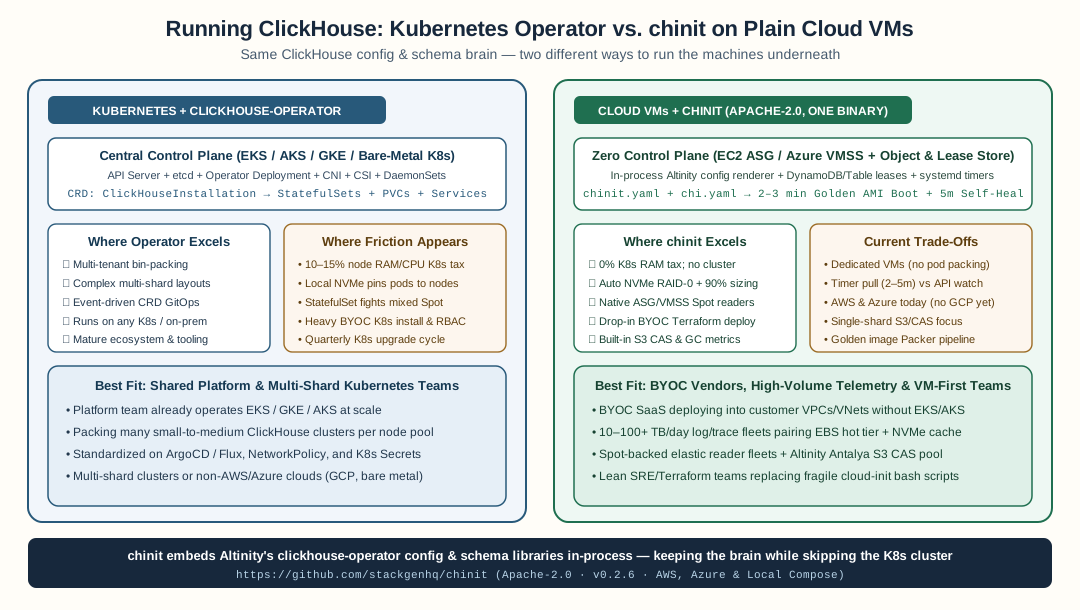
clickhouse-operator manages ClickHouse through Kubernetes pods and persistent volume claims; chinit embeds the same ClickHouse config and schema libraries inside a single binary on cloud VMs.
Why is ClickHouse hard to run in a cloud Auto Scaling Group (ASG) in the first place?
Because Auto Scaling Groups treat servers like nameless cattle, while ClickHouse treats servers like named teammates.
When AWS replaces a dead VM, the new machine wakes up with a random name like ip-10-0-1-147. ClickHouse Keeper — the coordination service that tracks which replica owns which data — doesn’t know who ip-10-0-1-147 is. It expects reader-2 to come back as reader-2.
Think of an office with numbered name badges hanging on a board at the front desk:
- Check-in at boot (
chinit boot): When a fresh VM launches, it walks up to the badge board — a tiny serverless table in Amazon DynamoDB or Azure Table Storage — and grabs the lowest free badge (say,reader-2). Only after it owns that badge doeschinitmount its disks, fetch passwords from the cloud secret store, generate ClickHouse’s XML files, and join the cluster. From empty VM to serving queries takes 2–3 minutes. - Checking in every 5 minutes (
chinit lease-renew): Every 5 minutes, each live VM taps the board to say “I still holdreader-2” and refreshes its local address book (/etc/hosts, Private DNS, and ClickHouse’s peer list). If a machine loses power instantly and never says goodbye, its badge expires after 15 minutes — and the surviving nodes automatically erase its dead DNS record, clean up its old Keeper entries, and move on. - Handing the badge back on shutdown (
chinit drain-shutdown): When an ASG scales in or AWS sends a 2-minute Spot warning,chinitpauses replication queues, stops ClickHouse cleanly so its Keeper session closes first, asks a healthy neighbor to unregister the replica, deletes its DNS record, and putsreader-2back on the board. (And if a node crashes mid-boot,v0.2.7reloads its settled badge straight fromstate.jsonon resume instead of starting blind.)
flowchart LR
    A["VM Launches<br/>(AWS ASG / Azure VMSS)"] --> B["1. Claim Badge<br/>writer-0 or reader-2<br/>in DynamoDB / Table"]
    B --> C["2. Prepare Machine<br/>Mount EBS + NVMe,<br/>fetch secrets, render XML"]
    C --> D["3. Self-Heal (Every 5m)<br/>Sync DNS, peers, queues,<br/>and grow full disks"]
    D --> E["4. Clean Exit<br/>Drain work, drop replica,<br/>return badge on shutdown"]
    style A fill:#f2f6fb,stroke:#28597a,color:#17283c
    style B fill:#fefce8,stroke:#9b6b24,color:#17283c
    style C fill:#eef8f3,stroke:#1f6f50,color:#17283c
    style D fill:#eef8f3,stroke:#1f6f50,color:#17283c
    style E fill:#fdf2f2,stroke:#b43c3c,color:#17283c
Best of all, chinit doesn’t invent its own half-baked XML templates. Because both projects are written in Go, chinit (v0.2.7) embeds the 0.28.0 configuration generator, clickhouse-backup config builder, live server-version detector, and schema syncer straight from Altinity’s clickhouse-operator. You get the same battle-tested ClickHouse configs without running Kubernetes underneath.
Where chinit Beats clickhouse-operator
First, credit where it’s due: Altinity’s clickhouse-operator (and ClickHouse Inc.’s operator) are great pieces of software. If Kubernetes is already the air your company breathes, they work well.
Where teams run into friction isn’t the operator itself — it’s what Kubernetes forces you to do when ClickHouse is heavy, cost-sensitive, or deployed outside your own cluster. Here are the four places where chinit on plain VMs comes out ahead.
1. Fast Local NVMe Cache + Safe EBS Storage (Without Node-Pinning Headaches)
When you store ClickHouse data in Amazon Simple Storage Service (S3) or Azure Blob Storage, the sweet spot for speed and safety uses two local drives per machine:
- A small, safe network disk (like AWS Elastic Block Store (
EBS)gp3) for your table catalog and the newest few minutes of un-merged writes. - A fast, disposable local NVMe SSD (the drives bundled with
r8gd,c8gd,i4g, or AzureLsv3VMs) as a giant read/write cache in front of S3. If a VM dies, the replacement starts with an empty cache and zero data loss.
On Kubernetes, mixing persistent EBS volumes with disposable node-local NVMe drives is surprisingly clunky. Standard Kubernetes StatefulSet storage templates expect network disks that follow a pod from host to host. Using a physical host’s local NVMe requires hostPath mounts or extra local-storage drivers that glue pods to specific physical machines — and if you scale up to a bigger VM with a larger NVMe drive, hardcoded cache sizes in your XML either waste space or crash ClickHouse at startup.
In chinit (v0.2.7), this works out of the box:
- It checks the actual hardware label and model. Even if AWS enumerates a
474 GBdisposable NVMe drive ahead of your64 GBEBS disk,chinitrecognizes the hardware model (Amazon EC2 NVMe Instance Storage/Microsoft NVMe Direct Disk) and never puts your table metadata or Keeper logs on a drive that vanishes on stop. - It stripes multiple NVMe drives automatically. Boot a larger VM with two or four local NVMe drives and
chinitmerges them into one fastRAID-0cache volume automatically. - It sizes the cache to the machine. At boot,
chinitmeasures the mounted cache disk and sets ClickHouse’s cache ceiling to 90% of that drive automatically — so scaling from a2xlargeto a4xlargerequires zero config edits.
2. Cheap Spot Readers Without Fighting StatefulSet Rules
Query traffic is spiky: engineers and alerting dashboards hammer ClickHouse during business hours and incidents, while nights are quiet. Running stateless-ish read replicas on Spot instances cuts reader compute bills by 60–70%.
A Kubernetes StatefulSet wasn’t designed for mixed Spot fleets. All pods in a StatefulSet share one template, get numbered 0, 1, 2…, and scale down strictly from the highest number downward — even if pod 0 is the one sitting on a Spot VM that AWS is reclaiming in two minutes. (ClickHouse Cloud’s own team wrote a great post on why they eventually had to break up single StatefulSets into one-StatefulSet-per-replica plus custom controllers.)
With chinit, writers live in an On-Demand group and readers live in a native cloud Spot Auto Scaling Group. AWS or Azure picks from multiple cheap Spot instance families, replaces whichever VM gets reclaimed, and chinit’s badge table hands the replacement its identity cleanly.
3. No “Kubernetes Tax” — Especially for BYOC (Customer Cloud Accounts)
Running Kubernetes just to host ClickHouse carries two real costs:
- Lost RAM on every database machine: Between
kubeleteviction buffers, networking agents, storage plugins, and monitoringDaemonSets, Kubernetes typically reserves 10–15% of each node’s RAM and CPU. On a64 GBor128 GBClickHouse server, that’s6–16 GBof memory taken away from ClickHouse’s caches and background merges — on top of the control-plane fee and quarterly Kubernetes upgrades. - Customer security friction (
BYOC): If your product deploys into your customers’ AWS or Azure accounts, asking their security team to approve an Elastic Kubernetes Service (EKS) or Azure Kubernetes Service (AKS) cluster, cluster-wide permissions, and half a dozen cluster add-ons slows deals to a crawl. Shipping a standard Terraform module that boots locked-down VMs from a checksum-verified image + S3 + DynamoDB is dramatically easier to review, deploy, and support.
4. Built-In Self-Healing and 1× Shared S3 Storage (CAS)
Historically, skipping Kubernetes meant giving up self-healing. chinit builds those safety nets into its 5-minute background timers:
- Automatic disk growth: Before ClickHouse runs out of merge headroom,
chinitexpands the EBS volume and resizes the filesystem online with zero downtime (or moves older partitions to S3 if the disk hits your size cap). - No stuck
ON CLUSTERqueries or blocked syncs: When higher-numbered nodes scale in,chinitsweeps their leftover DNS records, prunes dead entries from Keeper’s distributed query queue, and runs lightweight replica syncs (SYSTEM SYNC REPLICA ... LIGHTWEIGHT) so healing never times out behind a heavy background merge. - Shared S3 cold storage (
CAS) that survives fresh disks: Out of the box,chinit(v0.2.7) supports Altinity Antalya’s Content-Addressed Storage (cas_enabled = true), keeping one shared copy of cold data in S3 across all replicas instead ofNduplicates (you can run your own numbers in our interactive Non-CAS vs. CAS cold-storage calculator). Even when an ASG replaces a VM with a brand-new EBS disk,chinitpins a deterministic server UUID and CAS root identity from the node’s badge so CAS mounts cleanly without ownership collisions — while gating load-balancer:8123/replicas_statuschecks until new readers catch up, shipping OpenTelemetry boot and query spans (chinit span-ship), and exposing Prometheus health metrics for the CAS garbage collector.
The Honest Flip Side: Where clickhouse-operator Still Wins
No tool wins everywhere. Here is where clickhouse-operator on Kubernetes is clearly the better choice, and you should stick with it:
- Packing lots of small clusters onto shared hardware: If your company already has a Kubernetes platform team and you run 30 small ClickHouse clusters (
20–200 GBeach) for different teams or small tenants, Kubernetes lets you pack many pods onto a few big machines.chinitruns one ClickHouse role per VM — dedicating four VMs to a tiny database wastes money. - Multi-shard clusters:
chinitkeeps things simple by running a single shard (01) and scaling out with separate writers and readers over S3. For 90% of log, trace, and telemetry workloads (even at tens of terabytes a day), one shard backed by S3 is plenty. But if your workload splits writes across 8 or 16 shards,clickhouse-operatorhandles multi-shard layouts natively. - Instant GitOps pushes: Kubernetes controllers watch the API server and react in under a second when ArgoCD or Flux updates a YAML manifest. Because
chinithas no central control server, VMs check for updates on short background timers (every 2–10 minutes), unless you trigger an immediate refresh (chinit boot --refresh). - GCP and on-prem bare metal:
clickhouse-operatorruns anywhere Kubernetes runs — AWS, Azure, GCP, or bare-metal racks.chinitv0.2.7ships with AWS, Azure, and a local Docker Compose provider (-cloud composeindeploy/compose/for local laptop testing and CI); GCP and bare metal require writing a small Go provider adapter.
Side-by-Side Scorecard
| What Matters to You | clickhouse-operator (Kubernetes) |
chinit (Cloud VMs) |
Better Fit |
|---|---|---|---|
| Extra control plane to run & upgrade | Full K8s cluster + CNI + CSI + add-ons | None (uses S3/Blob + DynamoDB/Table) | chinit |
| Memory available to ClickHouse | Loses ~10–15% to K8s node reservations | ~100% of VM RAM goes to ClickHouse | chinit |
| Local NVMe SSD cache + safe EBS | Needs hostPath/node-pinning or local CSI |
Auto-detected, RAID-0 striped, auto-sized | chinit |
| Spot-instance read replicas | Awkward inside a single StatefulSet |
Native ASG / VMSS Spot pools | chinit |
| Deploying into customer VPCs (BYOC) | Heavy setup & quarterly K8s upgrades | One tofu apply, ~2–3 min boot |
chinit |
| Hosting 20+ small DBs cheaply | Packs many small pods onto shared nodes | One VM per role (overkill for tiny DBs) | clickhouse-operator |
| Multi-shard clusters (e.g. 16 shards) | Built-in CRD shard × replica matrix | Focused on single-shard S3/CAS scale-out | clickhouse-operator |
| Running on GCP or on-prem bare metal | Works on any Kubernetes cluster | AWS & Azure today (Go interface for others) | clickhouse-operator |
| ClickHouse XML & schema generation | Altinity generator & ClusterSchemer |
Same Altinity libraries compiled in | Tie |
Who Benefits Most from chinit?
To make the decision easy, here is who gets the biggest win from chinit:
- SaaS teams doing BYOC (Bring Your Own Cloud): If you deploy an observability, security, or analytics engine inside your customers’ AWS or Azure accounts,
chinitlets you ship a rock-solid, auto-healing ClickHouse cluster with plain Terraform — zero customer-side Kubernetes clusters to install, debug, or upgrade. - High-volume log, trace, and telemetry teams (
10–100+ TB/day): When ClickHouse is big enough to own whole VMs, getting 100% of the machine’s RAM, effortless NVMe caching, Spot query readers, and1×shared S3 cold storage directly lowers your monthly cloud bill. - Terraform-first / lean SRE teams: If your stack runs on EC2 or Azure VMs without a dedicated Kubernetes platform team — and you currently rely on a giant
cloud-initbash script nobody wants to touch on Friday afternoon —chinitgives you tested, compiled guardrails.
And who should skip it?
- If your team already lives happily on Kubernetes and runs small-to-medium ClickHouse clusters on shared node pools, keep using
clickhouse-operator. - If you don’t want to manage ClickHouse at all and your budget allows it, buy ClickHouse Cloud or Altinity.Cloud.
Try It Out in 5 Minutes
Everything is open source under Apache-2.0 at github.com/stackgenhq/chinit:
- Single Go binary (
v0.2.7): Prebuilt static binaries for Linux and macOS (arm64andamd64) withSHA256SUMS, plus a local multi-node Docker Compose cluster (deploy/compose/) for testing on your laptop. - Packer Golden Images: Ready-to-build templates in
images/awsandimages/azure(for both upstream ClickHouse LTS and Altinity AntalyaCAS). - Turnkey Terraform Modules: Drop
terraform/awsorterraform/azureinto a VPC andapply:
module "clickhouse" {
  source = "github.com/stackgenhq/chinit//terraform/aws"

  cluster_name  = "telemetry-prod"
  region        = "us-west-2"
  golden_ami_id = "ami-0f8511dd30c68ca21" # Pre-baked Golden AMI (or build from images/aws)

  writer_max     = 4
  writer_desired = 2
  reader_max     = 8
  reader_desired = 2
  reader_spot    = true
  keeper_count   = 3

  cas_enabled   = true # Optional: keep 1 shared copy of cold data in S3
  dns_zone_name = "clickhouse.internal"
  subnet_cidr   = "10.42.0.0/24"
}
If you run ClickHouse on VMs — or have been wondering whether you really need to stand up an EKS cluster just to keep ClickHouse healthy — give stackgenhq/chinit a look, try the Terraform example in a test VPC, and let us know what breaks or what you’d like to see next.
Related in this series: One Binary to Bootstrap a Node: Why chinit Replaced 3,600 Lines of Bash, Teaching an Operator Without Kubernetes, Graviton Roulette: The Day NVMe Device Names Broke Our Boot, and The Math of ClickHouse CAS on AWS.
v0.2.7 changelog highlights
dead-replica-gcURL-decodes Keeper DDL-queue znodes (%2D/%2E) — eliminates persistentDNSResolver/DDLWorkerwarnings for retired ordinals.HardwareSizingOverlayXMLcapsbackground_merges_mutations_concurrency_ratio = 2on hosts with<= 12 GiBRAM regardless of vCPU count — preventsCode: 241on 4-vCPU / 8 GiB readers under burst ingest.
FAQ
What is chinit in plain English?
chinit (short for ClickHouse init) is a free, open-source (Apache-2.0) Go binary at github.com/stackgenhq/chinit that turns a fresh AWS EC2 or Azure virtual machine into a working, self-healing ClickHouse cluster member in about 2 to 3 minutes. It replaces fragile cloud-init bash scripts and gives you safe scaling, Spot reader draining, disk auto-expansion, and automatic cleanup without needing a Kubernetes cluster.
Does chinit rewrite ClickHouse config generation from scratch?
No. chinit embeds the configuration generator and schema-sync packages from the Altinity Kubernetes Operator for ClickHouse directly inside its Go binary. You still describe your cluster in a clean YAML file; chinit just runs that proven logic on the VM itself instead of inside Kubernetes.
When is chinit a better fit than clickhouse-operator?
chinit shines in four places: (1) deploying into customer cloud accounts (BYOC) where standing up and maintaining EKS or AKS per customer is too heavy; (2) using fast, disposable local NVMe drives as an S3 cache alongside a safe EBS disk without pinning Kubernetes pods to physical hosts; (3) running cheap Spot read replicas in native cloud Auto Scaling Groups; and (4) giving 100% of a VM's RAM to ClickHouse instead of reserving 10-15% for Kubernetes agents.
When should I stick with clickhouse-operator on Kubernetes?
Use clickhouse-operator if your team already runs a shared Kubernetes platform, if you want to pack many small ClickHouse databases onto shared worker nodes, if you need multi-shard write clusters, or if you run on GCP or bare-metal servers (chinit currently supports AWS and Azure VMs).
How does chinit avoid wiping data on local NVMe drives?
At boot, chinit checks the hardware model of every attached drive. It never puts your table catalog or Keeper logs onto a disposable local NVMe drive — even if that NVMe drive is much bigger than your persistent EBS volume. Instead, it saves EBS for table metadata, automatically uses local NVMe (striping multiple drives together if needed) for your S3 cache, and sizes the cache to 90% of the drive automatically.
Who benefits most from chinit?
SaaS teams shipping BYOC data planes into customer VPCs, observability and security teams ingesting tens of terabytes of logs or traces a day, and Terraform-first engineering teams who run on VMs and want to retire thousand-line bash boot scripts.
Stay in the loop — production notes on AI agents, workflows, and SRE.
Low volume — new posts and curated reading lists. Unsubscribe anytime.