Chat Completions vs Responses API (and Why Agents Feel Slow)
When an investigation takes seven minutes, the endpoint name alone does not explain the delay. A debug trace can separate endpoint selection from model choice, reasoning effort, tool latency, and retries.
Three decisions are often conflated:
- Which API the runtime called (Chat Completions or Responses)
- Which kind of model ran (a normal chat model or a reasoning model)
- How hard that model was told to think (reasoning effort)
This post separates those three with language you can reuse in a runbook, plus fields you can check in a debug export. Related reading: reasoning effort, reasoning vs normal models on tool-heavy jobs, planner on a thinking model, workers on a fast model.
What the evidence supports
| What people say | What is usually going on |
|---|---|
| “Responses is slow” | Check reasoning-token use, worker models, retries, and tool wait before assigning a cause |
“We used reasoning because the id says resp_” |
resp_ only means Responses API. Check whether usage reports reasoning tokens |
| “Turn thinking up on the newest model” | Check whether that model supports the requested tools and reasoning effort on the selected endpoint |
“The trace says operation=chat, so this is Completions” |
That label is often wrong or too coarse. Prefer the response id prefix |
Two separate decisions
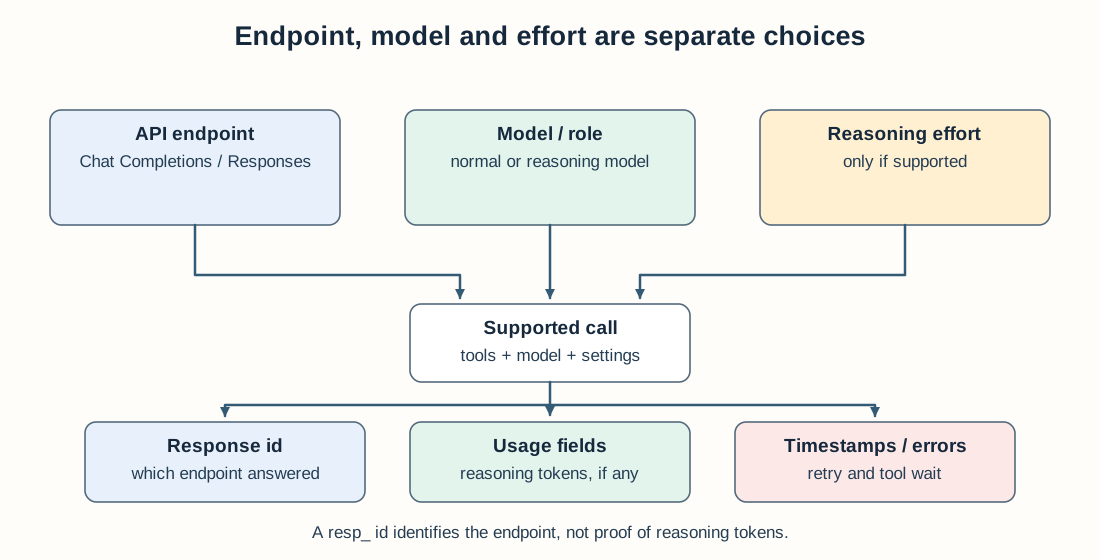
A response ID identifies an endpoint, not how much reasoning the model performed.
Think of a grid:
| Normal chat model | Reasoning model | |
|---|---|---|
| Chat Completions | Common agent loop | Compatibility with tools and reasoning effort varies by model |
| Responses API | Supported by compatible normal models | Supports the reasoning-and-tools configurations used in the examples here |
API (rows): which OpenAI endpoint (or compatible server) your runtime calls. Completions responses are often id’d chatcmpl_…. Responses API ids are often resp_….
Model class (columns): a normal model that mostly writes the answer you see, vs a reasoning model that may also spend hidden thinking tokens before that answer. Reasoning tokens can add usage and latency; traces may expose them as output_reasoning_tokens or reasoning_tokens. Pricing and reporting vary by model and provider, so inspect the usage record rather than assuming a separate rate.
You can put a normal model on Responses. You can also fail a reasoning call on Completions and only succeed after a retry on Responses. Those are different problems.
Why Chat Completions rejects some reasoning calls
In the model configuration used for our Go runtime, some tools-plus-reasoning calls were rejected on Chat Completions and succeeded on Responses. This is a compatibility observation for those calls, not a rule for every OpenAI-family model or future API version.
When our Go runtime was Completions-first, we saw:
- clear HTTP 400 errors when someone put a high-thinking model on a tool-heavy worker
- temporary workarounds that used an older model that still accepted tools on Completions
- occasional extra wait and request overhead: Completions fails, then Responses succeeds; whether the failed request incurs model-token charges depends on the provider’s billing behavior
Today the OpenAI path can prefer Responses when the model catalog says thinking levels exist, and it can still fall back from Completions to Responses when the first call refuses tools + thinking. The effort dial still matters: reasoning effort is not free.
Takeaway. Supporting Responses does not mean every worker should think hard. It means the call does not die with a 400 when a reasoning model needs tools. Which model each role uses still decides latency (hybrid plan).
Is Responses slower?
Not on the evidence here. We did not run a controlled same-model, same-input endpoint latency test. Diagnose the slow path from per-call timestamps and usage before assigning the cost to the API.
What actually slows a run:
- Hidden thinking tokens — the model spends time before you see a tool call or a sentence
- High thinking on every worker turn — a long think before each metric or log query
- Retry after a Completions error — you pay for a failed call and then the real call
- Huge prompts and one-at-a-time workers — still the main cost of many investigate-alert sessions
On a recent investigator export: almost every primary-model hop used Responses (resp_…), many hops reported reasoning tokens, and a few helper hops on another model reported none. The slow part was how the dig was shaped and how much thinking we asked for, not “we picked the wrong endpoint name.”
How to read a debug export
Export one run (how we debug multi-step agents · one zip, one conversation). In the LLM call records inside execution.json:
| What to look at | Chat Completions | Responses / thinking |
|---|---|---|
| Response id | starts with chatcmpl_ |
starts with resp_ |
| Reasoning token fields | missing or zero | often greater than zero |
| Reasoning effort setting | often absent | may be set; missing does not always mean “no thinking” if the model defaults to some thinking |
Also check which model each role received. A reasoning planner with lower-effort tool workers is one configuration to test, not a universal best mix. If every worker uses high effort, compare per-turn reasoning tokens and tool wait against a lower-effort worker on the same job.
Do not trust gen_ai.operation.name: chat alone. We still see that label on Responses calls.
Checklist for builders
- In docs, say API and model class as two sentences, not one buzzword
- Use Responses (or Completions then Responses on refuse) when tools and thinking are both required
- Log response id prefix and reasoning token counts on every model call
- Default workers to a normal / low-thinking model; keep hard thinking for planning and final write-up
- When a run is slow, ask “did it think?” before “is Responses broken?”
Where to go next
- Reasoning effort is not a free upgrade — where to spend thinking time
- Reasoning vs generate models for tool-heavy agents — which model class fits a Grafana job
- Hybrid plan: smart planner, generate digs — different models for planner and workers
- Best way to debug a multi-step AI agent — one golden prompt, one export, fix the host first
If the trace shows high reasoning-token use, reduce or relocate that effort and rerun. If most elapsed time is tool wait, changing endpoints or models may do little.
Routing Completions vs Responses in a production agent runtime? Find me on GitHub or LinkedIn.
StackGen works on AI-assisted incident triage and diagnostic workflows. See ai.stackgen.com for the offering.
FAQ
Is the Responses API slower than Chat Completions?
Usually no. If you use the same model, the same tools, and you are not asking the model to do extra hidden thinking, both APIs take about the same time. Runs feel slow when the model spends tokens on internal reasoning, when every worker thinks hard, or when the client tries Completions first, gets an error, then retries on Responses.
How do I know which API an agent run used?
Open the execution debug export and look at the model call records. Response ids that start with resp_ came from the Responses API. Ids that start with chatcmpl_ came from Chat Completions. If the usage block lists reasoning tokens (often named output_reasoning_tokens), the model also did hidden thinking on that turn.
Is using the Responses API the same as using a reasoning model?
No. The API is only how your app talks to the provider. A normal chat model can use Responses. A reasoning model can still fail on Chat Completions when you attach tools and turn thinking on. Pick the API for compatibility. Pick the model for how hard it should think.
Stay in the loop — production notes on AI agents, workflows, and SRE.
Low volume — new posts and curated reading lists. Unsubscribe anytime.