Running AppWorld Locally for Aiden Agent Evals: Docker Compose, MCP, and Things We Wish We Knew Upfront
Skip this post if you only want eval lessons — start with how to evaluate AI agents or multi-agent vs single-agent. Come back here when you need to reproduce the stack.
Prerequisite for the AppWorld eval series (fair evals → orchestration tax → failure modes → handoff gate): get the benchmark running on your machine before you argue about planner tax or failure modes.
We wired the Aiden agent runtime to the official AppWorld MCP server (paper) to compare one agent with a planner and workers. AppWorld is a simulated set of apps; Model Context Protocol (MCP) supplies a standard way for the agent to discover and call their actions. This post is the ops guide we wanted on day one: Docker Compose, copy-paste snippets, and the traps that burned an afternoon.
Before you start a task
There are three services: the environment on port 8000 starts and grades tasks; the APIs on 9000 hold the simulated app data; the MCP HTTP server on 10000 lists actions for the agent. For example, the test runner (the “harness”) calls /initialize for task 29caf6f_1, the agent might call spotify__login through MCP, and the runner calls /save and /evaluate afterward. If port 8000 responds but MCP lists no tools, the agent still cannot work. Check all three before a batch. The published image used here lacked MCP; the GAGE Dockerfile shows the extend-and-reinstall approach. Check your installed version rather than assuming latest will retain that limitation.
Architecture (one screen)
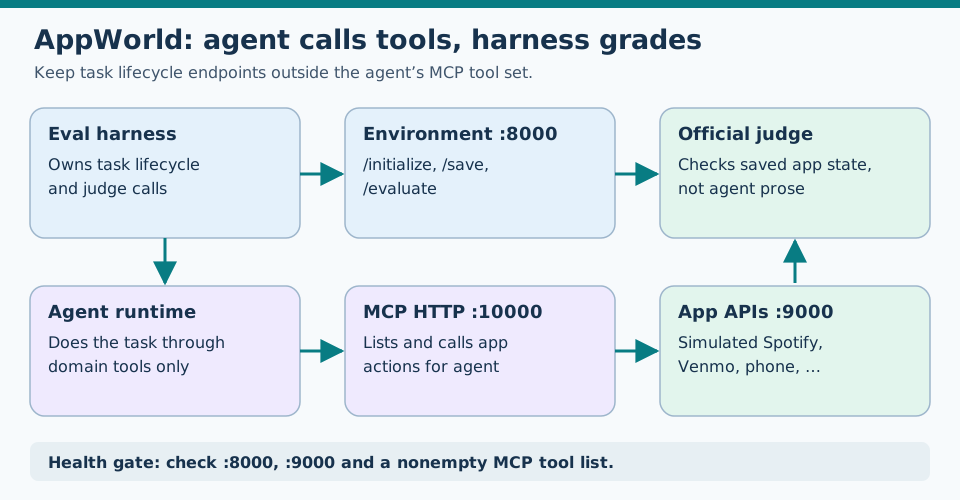
Caption: The harness owns initialization and grading; the agent reaches simulated apps through MCP, with all three services checked first.
eval harness                agent (Aiden runtime, etc.)
     |                              |
     | POST /initialize             | streamable_http MCP
     v                              v
environment :8000              MCP HTTP :10000/mcp
     |                              |
     |                              | tool calls
     v                              v
              APIs :9000  (mock Spotify, Venmo, phone, …)
     |
     | POST /save, POST /evaluate
     v
        official TGC/SGC judge
| Port | Service | You call it for |
|---|---|---|
| 8000 | appworld serve environment |
/initialize, /save, /evaluate |
| 9000 | appworld serve apis |
Stateful mock HTTP APIs (agent reaches these via MCP) |
| 10000 | appworld serve mcp http |
list_tools / call_tool — names like spotify__login |
Our runtime prefixes the MCP server name: spotify__login → appworld_spotify__login.
Upstream documents the full three-server flow for terminal agents in guides/evaluating_terminal_agents.md.
Things we wish we knew upfront
1. The official Docker image is a base layer, not the full stack
docker pull ghcr.io/stonybrooknlp/appworld:latest gives you an older build with serve environment|apis only. In the image version we used, there was no serve mcp or serve multiple. PyPI appworld 0.1.3 matched that era; inspect your version because upstream may change.
Fix: Reinstall appworld[mcp] from current stonybrooknlp/appworld main on top of the image — exactly what GAGE’s Dockerfile does. The serve mcp subcommand lives in current source, not the published image.
2. Git clone ≠ installable AppWorld
src/appworld/.source/apps.bundle and tests.bundle are encrypted blobs, often shipped via Git LFS. A shallow clone without Git LFS (the extension used to fetch large files) can leave small pointer text files in place of the bundles; appworld install then fails or unpacks incomplete apps.
cd /path/to/appworld
git lfs pull
pip install -e ".[mcp]"
appworld install
appworld download data
Workaround without LFS auth: seed bundles from a PyPI wheel:
pip download appworld -d /tmp/aw-wheel --no-deps
unzip -o /tmp/aw-wheel/appworld-*.whl 'appworld/.source/*' -d /tmp/aw-whl
cp /tmp/aw-whl/appworld/.source/*.bundle /path/to/appworld/src/appworld/.source/
appworld install
3. MCP does not expose load_task or evaluate
Early wiring duplicated upstream with custom tools (appworld_load_task, appworld_call, appworld_evaluate). Official MCP exposes per-API tools only (venmo__like_transaction, etc.) — see the MCP server docs.
Your harness must call the environment HTTP API directly (same contract as evaluating_terminal_agents.md):
# 1. Before agent run
curl -s -X POST http://127.0.0.1:8000/initialize \
  -H 'Content-Type: application/json' \
  -d '{"task_id":"29caf6f_1","remote_apis_url":"http://127.0.0.1:9000","experiment_name":"local"}'

# 2. Agent works via MCP …

# 3. After agent run
curl -s -X POST http://127.0.0.1:8000/save \
  -H 'Content-Type: application/json' \
  -d '{"task_id":"29caf6f_1"}'

curl -s -X POST http://127.0.0.1:8000/evaluate \
  -H 'Content-Type: application/json' \
  -d '{"task_id":"29caf6f_1","suppress_errors":true}'
Trust the judge’s success bit — not assistant prose (evidence-based verification).
4. serve multiple races MCP if APIs are not ready
Starting all three in one CLI invocation is correct when your installed appworld supports it (cli.py, parallelizing_worlds.md):
appworld serve multiple \
  --environment '' \
  --apis '' \
  --mcp 'http --port 10000' \
  --root "$APPWORLD_ROOT"
Upstream’s terminal-agent guide uses the same pattern with explicit ports:
appworld serve multiple \
  --environment "--port 8000" \
  --apis "--port 9000" \
  --mcp "http --port 10000 --output-type content_only" \
  --root "$APPWORLD_ROOT"
On older installs, start apis first, wait, then environment, then MCP. Our Docker entrypoint falls back to that order automatically.
5. Env+apis can look healthy while MCP is dead
We repeatedly hit: curl :8000 and :9000 return 200, cohort starts, the agent lists zero MCP tools. Always gate on MCP list_tools before burning API credits — upstream ships scripts/call_mcp_server.py for exactly this smoke test.
6. Do not duplicate data/ under your agent repo
Point APPWORLD_ROOT at one upstream checkout. Task DBs and api_docs belong there after appworld download data.
7. Apple Silicon: pin platform for the base image
The published image is linux/amd64. On ARM Macs, platform: linux/amd64 runs this x86 image through emulation, which can be slow. That was a workable tradeoff here compared with dependency and bundle mismatches in an incomplete local install; native builds may suit other setups.
Docker Compose (recommended path)
Requires Docker BuildKit (DOCKER_BUILDKIT=1) for additional_contexts (the extra AppWorld source directory made available to the image build). The example also assumes the linked reference harness paths and downloaded AppWorld data; it is not a standalone Compose file.
docker-compose.yml
services:
  appworld:
    platform: linux/amd64
    build:
      context: ${GENIE_APPWORLD_ROUTING:?set to examples/appworld-routing}
      dockerfile: docker/Dockerfile
      additional_contexts:
        appworld: ${APPWORLD_ROOT:?set to stonybrooknlp/appworld checkout}
      args:
        APPWORLD_VERSION: ${APPWORLD_VERSION:-git}
        APPWORLD_GIT_REF: ${APPWORLD_GIT_REF:-main}
        APPWORLD_ENV_PORT: ${APPWORLD_ENV_PORT:-8000}
        APPWORLD_APIS_PORT: ${APPWORLD_APIS_PORT:-9000}
        APPWORLD_MCP_PORT: ${APPWORLD_MCP_PORT:-10000}
    image: genie-appworld-stack:latest
    container_name: genie-appworld-stack
    ports:
      - "8000:8000"
      - "9000:9000"
      - "10000:10000"
    volumes:
      - ${APPWORLD_ROOT}/data:/run/data:rw
      - ${APPWORLD_ROOT}/experiments/outputs:/run/experiments/outputs:rw
    restart: unless-stopped
docker/Dockerfile (extends official image)
# syntax=docker/dockerfile:1
ARG APPWORLD_PLATFORM=linux/amd64
FROM --platform=${APPWORLD_PLATFORM} ghcr.io/stonybrooknlp/appworld:latest

WORKDIR /run
ENV APPWORLD_ROOT=/run

RUN apt-get update && \
    apt-get install -y --no-install-recommends gcc python3-dev build-essential git && \
    apt-get clean && rm -rf /var/lib/apt/lists/*

ARG APPWORLD_VERSION=git
ARG APPWORLD_GIT_REF=main
COPY --from=appworld . /tmp/appworld-src

RUN if [ "${APPWORLD_VERSION}" = "git" ]; then \
        git clone --depth 1 --branch "${APPWORLD_GIT_REF}" \
          https://github.com/stonybrooknlp/appworld.git /tmp/appworld-src && \
        cd /tmp/appworld-src && pip install --no-cache-dir --upgrade ".[mcp]"; \
    elif [ "${APPWORLD_VERSION}" = "source" ]; then \
        cd /tmp/appworld-src && pip install --no-cache-dir --upgrade ".[mcp]"; \
    else \
        pip install --no-cache-dir --upgrade "appworld[mcp]"; \
    fi && \
    pip install --no-cache-dir --upgrade "typer==0.16.0" "click==8.1.7"

RUN appworld install && appworld download data

COPY docker/entrypoint.sh /usr/local/bin/appworld-stack-entrypoint.sh
RUN chmod +x /usr/local/bin/appworld-stack-entrypoint.sh

EXPOSE 8000 9000 10000
ENTRYPOINT ["/usr/local/bin/appworld-stack-entrypoint.sh"]
GAGE also pins typer/click — without that, serve multiple flags can disagree between the base image and your reinstall.
Start and stop
export APPWORLD_ROOT=/path/to/stonybrooknlp/appworld
export GENIE_APPWORLD_ROUTING=/path/to/genie/examples/appworld-routing

# Build + run
DOCKER_BUILDKIT=1 docker compose -p genie-appworld up -d --build

# Or use the helper script in the open-source appworld-routing harness
USE_DOCKER=1 ./scripts/appworld_stack.sh

# Stop
docker compose -p genie-appworld down
After git lfs pull on your checkout, prefer a source build:
APPWORLD_VERSION=source USE_DOCKER=1 ./scripts/appworld_stack.sh
Local stack (no Docker)
When Docker is overkill, use two Python environments:
| Venv | Purpose |
|---|---|
.venv-appworld-stack |
PyPI appworld — reliable env + apis |
.venv-appworld |
Editable stonybrooknlp/appworld[mcp] — MCP HTTP |
# One-time setup
python3.11 -m venv .venv-appworld-stack
.venv-appworld-stack/bin/pip install appworld
cd "$APPWORLD_ROOT" && ../.venv-appworld-stack/bin/appworld install
../.venv-appworld-stack/bin/appworld download data

python3.11 -m venv .venv-appworld
.venv-appworld/bin/pip install -e "/path/to/stonybrooknlp/appworld[mcp]"
# … bundles + appworld install as above …
Start scripts (simplified; matches upstream MCP HTTP docs):
export APPWORLD_ROOT=/path/to/stonybrooknlp/appworld

.venv-appworld-stack/bin/appworld serve apis --no-show-usage --port 9000 --root "$APPWORLD_ROOT" &
sleep 2 # example only; wait for an actual readiness response before a cohort
.venv-appworld-stack/bin/appworld serve environment --no-show-usage --port 8000 --root "$APPWORLD_ROOT" &
sleep 2
.venv-appworld/bin/appworld serve mcp http \
  --remote-apis-url http://127.0.0.1:9000 \
  --port 10000 \
  --root "$APPWORLD_ROOT" &
Health gate (run before every cohort)
# Environment + APIs
curl -sf http://127.0.0.1:8000/ >/dev/null && echo "environment OK"
curl -sf http://127.0.0.1:9000/ >/dev/null && echo "apis OK"

# MCP — must return a non-empty tool list (upstream: scripts/call_mcp_server.py)
python3 scripts/call_mcp_server.py \
  --remote-apis-url http://127.0.0.1:9000 \
  --remote-mcp-url http://127.0.0.1:10000
Optional stronger check from upstream:
appworld verify tasks \
  --remote-apis-url http://127.0.0.1:9000 \
  --remote-mcp-url http://127.0.0.1:10000
Experiment dashboard (cohort progress)
While a cohort runs, open:
http://127.0.0.1:8000/dashboard?experiment=genie_routing&task_ids=29caf6f_1,3aa1a22_3,b0a8eae_3,60d0b5b_1
The UI shows per-task status, the latest API call (“where it is now”), and a re-evaluate action. Polls every few seconds.
Wire your agent (reference harness)
Point MCP at HTTP transport — not a custom stdio shim:
[[mcp.servers]]
name = "appworld"
transport = "streamable_http"
server_url = "${APPWORLD_MCP_URL}"
timeout = "180s"
export APPWORLD_MCP_URL=http://127.0.0.1:10000/mcp
Run a single-task smoke cohort:
./scripts/wait_for_appworld.sh
LIMIT=1 COHORT_PATH=tasks/plan_fit_5.json python3 scripts/run_decision_cohort.py
The harness initializes each task, streams the agent, then saves and evaluates — judge fields land in results.jsonl.
Split topology when MCP won’t build in-container
If your image only has env+apis (MCP install failed bundle check), run hybrid:
| Component | Where |
|---|---|
| environment + apis | Docker container on :8000 / :9000 |
| MCP HTTP | Host .venv-appworld on :10000 → remote-apis-url http://127.0.0.1:9000 |
This unblocks harness and judge work while you fix LFS/bundles for a single-container setup.
Monday-morning checklist
APPWORLD_ROOThasdata/fromappworld download data(once).- Bundles under
.source/are real files, not LFS pointers. - All three ports respond; MCP
list_toolsis non-empty. - Harness calls
/initializebefore the agent and/evaluateafter — agent never does. - Agent config uses official
{app}__{method}tools, not inventedlist_notesREST names (failure modes). - Cohort refuses to start if the stack is down — fail fast beats debugging hallucinated tool errors.
What’s next
With the stack up, run the eval series: fair tool parity → orchestration tax → failure taxonomy → handoff gate → how to evaluate unattended agents → multi-agent vs single-agent → simple vs plan: when to use which.
AppWorld codebase
- Repository
- MCP server docs ·
scripts/call_mcp_server.py src/appworld/cli.py—serve environment|apis|mcp|multiplesrc/appworld/serve/environment.py—/initialize,/save,/evaluateguides/evaluating_terminal_agents.md— three-server terminal eval walkthroughguides/parallelizing_worlds.md—serve multipleand parallel environmentssrc/appworld/.source/— encrypted app bundles (Git LFS)- Official container package — base image only; extend for MCP
Our wiring
- GAGE AppWorld Dockerfile — extend-base-image pattern we copied
- Open-source
appworld-routingharness — reference compose, stack scripts, and eval drivers (paths retain legacy env var names)
FAQ
What do I need to run AppWorld locally for agent evals?
Three services: environment (:8000) for task init/save/evaluate, APIs (:9000) for mock apps, and MCP HTTP (:10000) for per-app tools. The harness owns /initialize and /evaluate; the agent only calls MCP tools like spotify__login.
Can I use the published ghcr.io/stonybrooknlp/appworld Docker image as-is?
Not for MCP. The published latest image is ~2 years old and only serves environment|apis. Rebuild on top of it with appworld[mcp] from current source — same pattern as HiThink GAGE's Dockerfile.
Why does appworld install fail after a git clone?
Encrypted app bundles ship via Git LFS. A plain clone leaves pointer files under src/appworld/.source/*.bundle. Run git lfs pull, seed bundles from a PyPI wheel, or build the Docker image with APPWORLD_VERSION=git so the build clones and installs fresh.
Does the agent call load_task or evaluate?
No — not via MCP. Official MCP exposes app API tools only ({app}__{method}). Your eval harness must POST /initialize before the agent runs and POST /save + /evaluate after.
How do I know the stack is ready before a cohort?
Probe environment and APIs with HTTP GET, then list_tools on MCP (non-empty). We gate cohorts on all three; starting the agent when MCP is down produces confusing tool-missing errors.
Stay in the loop — production notes on AI agents, workflows, and SRE.
Low volume — new posts and curated reading lists. Unsubscribe anytime.